

How to Bill Clients for Architectural Services by Project Phase Using Time Tracking Software

Architecture is one of the few professions where a single project can run for months or years and pass through entirely different types of work, from early concept sketches to final site inspections. Billing a project like this as one flat hourly total hides what actually happened. It tells the client nothing about where their fee went, and it tells the firm nothing about which phases are profitable and which are quietly losing money.
Phase based billing solves this. Instead of tracking time against a project as a whole, time is tracked against each project phase individually, schematic design, design development, construction documents, bidding, and construction administration. Each phase can carry its own billing rate, its own budget, and its own invoice line. This guide covers how phase based billing works, how to set it up using time tracking software, and how to handle reimbursable expenses alongside it.
What Is Phase Based Billing for Architects?
Most architecture engagements follow a standard sequence of phases, often based on the AIA (American Institute of Architects) framework. The exact names vary by firm and contract, but the typical phases are:
- Schematic Design (SD), early concept development and initial design options
- Design Development (DD), refining the chosen design with more detail and coordination
- Construction Documents (CD), producing the detailed drawings and specifications used for permitting and construction
- Bidding or Negotiation, supporting the client in selecting a contractor
- Construction Administration (CA), site visits, responding to contractor questions, and reviewing submittals during construction
Phase based billing means tracking time, rates, and budgets separately for each of these. A firm might bill Schematic Design at a lower blended rate because it involves more junior staff exploring options, while Construction Administration might bill at a higher rate because it requires senior oversight and carries more liability.
Without phase tracking, all of this gets averaged into a single number. With it, a firm can see exactly how many hours each phase actually took compared to what was budgeted, well before the project is finished. ProjecTime supports assigning time entries to individual project phases, with separate billing rates configured for each phase.
Why Tracking Time by Phase Matters
It Reveals Which Phases Are Actually Profitable
A fixed fee project might look profitable overall while one phase is quietly running over budget and another is running under. If Design Development consistently takes 40 percent more hours than budgeted across multiple projects, that is a pattern worth addressing, either through better fee estimation for that phase or through process changes. Phase level data is the only way to see this. A single total at the end of the project hides it completely.
It Supports Percentage of Completion Billing
Many architecture contracts are structured around percentage of completion, where each phase represents an agreed percentage of the total fee (for example, Schematic Design might be 15 percent of the fee, Design Development 20 percent, Construction Documents 35 percent, Bidding 5 percent, and Construction Administration 25 percent). Invoicing against these percentages requires knowing when a phase is substantially complete, which is much clearer when time and deliverables are tracked by phase rather than guessed at. ProjecTime supports percentage of completion, fixed fee per phase, and hourly billing, so firms using any of these structures can track against the model their contracts are written around.
It Improves Future Proposals
Historical phase data is the best input for pricing the next project. If a firm’s last five Construction Documents phases for similar sized projects averaged 220 hours, that number should anchor the next proposal, not an optimistic guess. Over time, phase level tracking turns project estimation from guesswork into something based on the firm’s own track record.
How to Set Up Phase Based Billing Using Time Tracking Software
Set Up the Project With Phases as Sub Tasks or Cost Codes
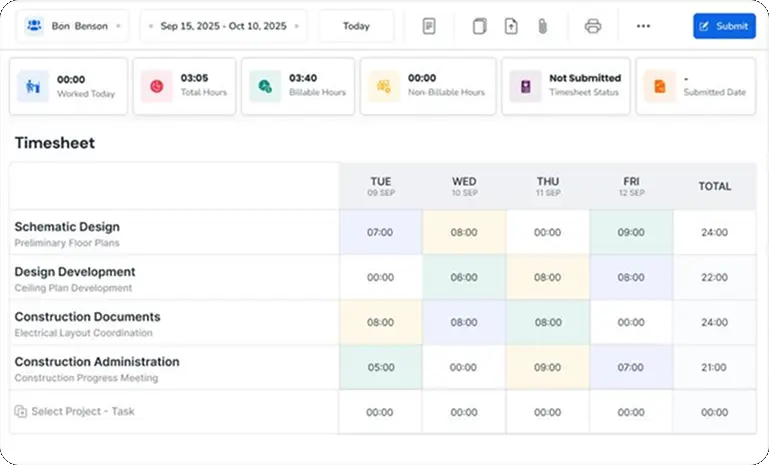
In ProjecTime, create the overall project, then add each phase, Schematic Design, Design Development, Construction Documents, Bidding, Construction Administration, as separate tasks within that project. This means every time entry can be assigned not just to the project, but to the specific phase the work belongs to.
This structure also makes it straightforward to add future phases if a project scope expands, without disrupting the data already recorded for completed phases.
Assign Billing Rates by Phase or by Role
Different phases often involve different staff seniority and therefore different effective rates. A principal architect’s time during client presentations in Design Development costs more than a drafter’s time producing standard details in Construction Documents. ProjecTime allows billing rates to be set per project, per phase, and per role, so the correct rate applies automatically based on who logged the time and which phase it was logged against, without anyone needing to calculate it manually at invoice time.
Track Time Against the Correct Phase as Work Happens
Using ProjecTime’s timer, staff select the project and the specific phase before starting work, whether that is a Schematic Design sketch session, a Design Development coordination meeting, or a Construction Administration site visit. Because the timer runs on desktop and mobile, site visits during Construction Administration get logged in real time rather than reconstructed afterwards from memory.
Review Phase Progress Against Budget Throughout the Project
Rather than waiting until a phase is finished to find out it ran over, ProjecTime’s reporting lets project leads see hours logged per phase against the budgeted hours for that phase at any point. A Design Development phase that has used 70 percent of its budgeted hours while only 40 percent of the deliverables are complete is a signal to address scope, staffing, or client expectations before the phase finishes, not after.
Tracking Reimbursable Expenses Alongside Phase Billing
Architectural projects generate reimbursable expenses throughout every phase, and these need to be tracked with the same phase level detail as time. Common reimbursable categories include:
- Printing and plotting, large format prints of drawings for client reviews and permit submissions
- Travel, mileage and travel time for site visits, particularly during Construction Administration
- Materials and samples, physical material samples ordered for client presentations during Design Development
- Consultant fees, structural, MEP, or other sub consultants billed through the architect to the client
- Permit and application fees, paid on the client’s behalf during Construction Documents or Bidding
In ProjecTime, expenses are logged against the same project and phase structure as time, using expense types to categorize them (printing, travel, materials, consultant fees, and so on). Each expense entry can require receipt attachment and goes through an expense approval workflow before being included on a client invoice, the same way time entries go through timesheet approval.
This matters because reimbursable expenses are often the most disputed line items on architecture invoices. A client is far less likely to question a $340 printing charge for Construction Documents if the invoice clearly shows it was for the large format prints of the permit set submitted that month, with a receipt attached. ProjecTime’s expense sheet keeps this documentation attached to the specific phase and project automatically, so it is available the moment a client asks.
What a Phase Based Invoice Looks Like
The output of all this tracking is an invoice that reflects the actual structure of the engagement rather than a single opaque total. ProjecTime invoices list each project or phase as its own line item, with the billed amount for that line, followed by a sub total, any discount, and the grand total. For a phase based engagement, each phase appears as its own project line, for example a project named for the building plus the phase, such as “123 Main St, Design Development Phase”, with its fee shown as the billed amount for that line.
| Project Name (includes phase) | Expense / Service Description | Billed Amount |
| 123 Main St, Schematic Design Phase | Architectural Services, SD Phase (billed previously) | $0.00 |
| 123 Main St, Design Development Phase | Architectural Services, DD Phase | $8,500.00 |
| 123 Main St, Design Development Phase | Reimbursable, Material Samples | $210.00 |
| 123 Main St, Construction Documents Phase | Architectural Services, CD Phase (in progress) | $23,600.00 |
| 123 Main St, Construction Documents Phase | Reimbursable, Printing and Plotting | $340.00 |
| Sub Total | $32,650.00 | |
| Discount | $0.00 | |
| Grand Total | $32,650.00 | |
This format gives clients a clear view of which phase each charge belongs to and keeps reimbursable expenses itemized separately from professional fees within the same project line structure, all rolling up to a single sub total, discount, and grand total at the bottom of the invoice, matching the format ProjecTime generates for every project.
What to Look for in Time Tracking Software for Phase Based Billing
Not every time tracking tool supports the way architecture firms actually bill. When evaluating a tool for phase based architectural billing, confirm it covers each of the following.
- Time entries assignable to project phases or sub tasks. Without this, all time on a project is lumped together and phase reporting is impossible.
- Billing rates configurable per phase and per role. A principal’s rate during Construction Administration should differ automatically from a drafter’s rate during Construction Documents, without manual recalculation.
- Support for percentage of completion, fixed fee, and hourly billing. Architecture contracts use all three models, sometimes within the same project.
- Reimbursable expense tracking tied to projects and phases. Expense tracking with receipt attachment and approval keeps disputed line items to a minimum.
- Phase by phase invoicing. Invoices that itemize fees and expenses by phase, as shown above, rather than a single total.
- Mobile time entry. Construction Administration involves site visits away from a desk, so logging time from a phone matters.
- Timesheet and expense approval workflows. Approval workflows catch misattributed phase entries while details are still fresh, and keep an audit trail for every entry.
- Accounting integration. Phase based invoices should flow into accounting software without re-entry. ProjecTime integrates directly with QuickBooks Desktop, QuickBooks Online, and Xero, see the guide on transferring ProjecTime timesheets to QuickBooks, and connects to other tools via Zapier.
ProjecTime covers all of these. The free plan includes the full timesheet feature for up to three users and three projects, enough for a small practice to set up phase based tracking on a live project and see how it works. Expense tracking, time off management, attendance, and advanced project management are each available at $3 per user per month and $2/user annually as the practice grows. See the ProjecTime pricing page for full details.
Bill by Phase, Not by Guesswork
Phase based billing turns a single opaque project total into a clear, phase by phase record of where time and budget actually went, and gives clients an invoice that reflects the real structure of the engagement. ProjecTime’s time tracking software for architects supports phase level time tracking, per phase and per role billing rates, percentage of completion and fixed fee billing, and reimbursable expense tracking with receipt attachment and approval, all flowing directly into phase by phase invoices.
⚡ Unified Workforce Management: Project Time Tracking, Expense Reports, and GPS-Geofenced Attendance
Stop paying for separate software modules. Experience the power of ProjecTime by TimeAppz risk-free with our 30-Day Full-Feature Trial—no credit card required. Scaling down or running a small team? Switch to our Permanently Free Plan, which includes core timesheets, billing, and invoicing capabilities for up to 3 users and 3 projects forever.

Related Blogs
 DCAA Timekeeping Requirements: A Practical Guide for Government Contractors
If your organization holds a cost-reimbursable, time-and-materials, or labor-hour government contract
TimeAppz
 Timesheet Reminders: How to Ensure On-Time Submission Every Week
Late timesheet submissions are a management problem before they are an employee
TimeAppz
 Timesheet Approval Process: Best Practices for Teams
A timesheet without an approval is not a reviewed document. It is
TimeAppz