

Timesheet Reminders: How to Ensure On-Time Submission Every Week

Late timesheet submissions are a management problem before they are an employee problem. When there is no consistent, reliable prompt to submit by a specific time, submission depends entirely on individual memory and motivation. Some people remember every week. Most do not, at least not consistently. The result is a manager spending part of every pay period chasing people individually, payroll processing being delayed, and billing cycles pushed back while the team waits for complete data.
The fix is not stricter policies or more frequent manual reminders from managers. It is automated timesheet reminders that fire at the right moment, consistently, without requiring anyone to remember to send them. This guide covers why timesheet submissions are late, how to configure an effective reminder system, best practices for timing and targeting, and how to use submission compliance reporting to identify where the process is breaking down.
Why Timesheet Submissions Are Late
Before configuring reminders, it helps to understand why submissions are late in the first place. There are three distinct causes and each points to a different part of the solution.
1. Employees Did Not Know the Deadline
If the submission deadline has not been clearly communicated and is not consistently reinforced, employees cannot be expected to meet it reliably. This is particularly common in organizations that have added timesheet requirements gradually without ever formally establishing a submission standard. The fix is a published, consistent deadline combined with automated reminders that make the deadline visible every period.
2. Employees Forgot Despite Knowing the Deadline
Even employees who know the deadline and intend to submit on time get pulled into other work and miss the window. This is not a discipline problem. It is a memory and attention problem that automated reminders solve entirely. A reminder that fires 48 hours before the deadline and again on the deadline day removes the need for the employee to independently remember to submit.
3. Employees Did Not Complete Their Time Entries
Sometimes the submission is late because the entries themselves are not complete. The employee opened the timesheet, realized they could not remember what they worked on three days ago, and closed it without submitting. This is the reconstruction problem covered in the timesheet automation guide. The solution is calendar integration and real-time tracking that keeps entries up to date throughout the week, so the timesheet is essentially complete before the submission reminder even fires
How Automated Timesheet Reminders Work in ProjecTime
In ProjecTime, automated timesheet reminders are configured through the timesheet policies settings. Once configured, the system monitors submission status for each employee and sends email reminders automatically based on the rules you define. No manual action is required from managers once the policy is set up.
What You Can Configure
| Setting | What It Controls | Recommended Configuration |
| Submission deadline | The day and time by which timesheets must be submitted each period | Friday 5pm for weekly teams, last day of pay period for biweekly or monthly cycles |
| First reminder timing | How many days before the deadline the first reminder fires | 2 days before: gives employees time to complete entries before the deadline |
| Second reminder timing | A second reminder closer to or on the deadline | Day of deadline: fires on the morning of the submission day as a final prompt |
| Post-deadline reminder | A reminder after the deadline for employees who still have not submitted | 1 day after: catches employees who missed the deadline without requiring manual follow-up from the manager |
| Target: full team or individuals | Whether the reminder goes to all employees or only those who have not submitted | All employees for the first reminder, non-submitters only for subsequent reminders |
| Reminder channel | How reminders are delivered | Email: reaches employees regardless of whether they are logged into ProjecTime |
Reminders in ProjecTime can be targeted to specific individuals rather than the entire team. This matters for organizations where different employees or teams have different submission schedules, or where only specific individuals have been consistently late and a targeted reminder is more appropriate than a blanket team notification.
The Submission Compliance Dashboard
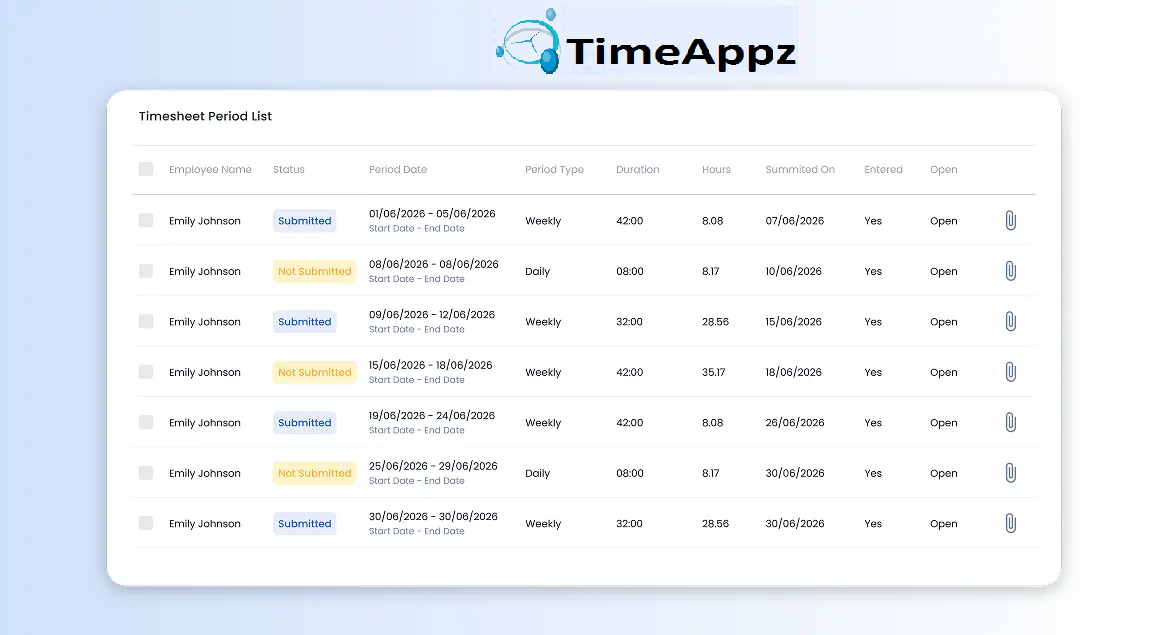
Sending reminders is one part of the solution. Knowing whether they worked is the other. ProjecTime’s reporting includes a submission compliance view that shows managers at a glance which employees have submitted their timesheets for the current period and which have not. This replaces the common practice of managers manually checking each person’s timesheet status one by one before the approval deadline.
|
What the dashboard shows |
The compliance view is also useful for identifying patterns over time. An employee who submits late every second week has a different problem from one who consistently submits on the day of the deadline. One may need the reminder timing adjusted. The other may need the deadline itself communicated more clearly. The data from the compliance dashboard lets managers make these adjustments based on actual behavior rather than perception.
Best Practices for Timesheet Reminder Configuration
- Reminder 1: 2 days before the deadline. Gives employees time to complete missing entries while work is still reasonably fresh in memory.
- Reminder 2: Morning of the deadline day. A final prompt for anyone who received the first reminder but has not yet submitted.
- Reminder 3: 1 day after the deadline, sent only to employees who have still not submitted. Catches the genuine cases of forgetting versus the cases of not caring.
Use a Three-Reminder Sequence
A single reminder on the deadline day is better than nothing but leaves no room for employees to act before the moment the deadline arrives. A three-reminder sequence gives maximum coverage:
|
Why three reminders matter |
Send Post-Deadline Reminders to Non-Submitters Only
Sending a post-deadline reminder to the entire team penalizes employees who submitted on time with an unnecessary notification. Configure post-deadline reminders in ProjecTime to fire only for employees whose submission status is still pending. Employees who submitted receive nothing. Only the non-submitters get the follow-up.
Set Individual Reminders for Consistently Late Submitters
If the submission compliance dashboard shows that specific individuals are consistently late regardless of team-wide reminders, configure a targeted individual reminder for those employees with earlier timing. Someone who consistently submits on the last possible day benefits from a reminder that fires 3 or 4 days before the deadline rather than 2. ProjecTime’s individual reminder targeting makes this possible without changing the configuration for the rest of the team.
Align the Reminder Timing With How Your Team Actually Works
Tell Employees What the Reminder System Does Before You Turn It On
Automated reminders work best when employees understand what they are receiving and why. Communicate the reminder schedule during onboarding or when rolling out the system: here is when reminders fire, here is what they mean, and here is what to do when one arrives. Employees who understand the system respond to reminders more reliably than those who receive an unexpected email that they treat as optional. Pair the reminder communication with a clear statement of the submission deadline and the consequence of late submission on payroll or billing cycles.
Timesheet Reminders for Specific Team Types
| Team Type | Submission Frequency | Recommended Reminder Timing | Special Consideration |
| Consulting firms | Weekly or per project milestone | 2 days before, day of deadline | Reminders help capture billable hours before memory fades across multiple client projects |
| Architecture firms | Weekly or per project phase | 2 days before, day of deadline | Phase billing accuracy depends on complete weekly entries before phase invoices are generated |
| Healthcare teams | Daily or weekly depending on shift structure | Same day or next day for daily submission, 2 days before for weekly | Daily submission requirement for DCAA-compliant government health contracts |
| Agencies | Weekly | 2 days before, day of deadline, 1 day after for non-submitters | Multi-client billing means late submissions delay multiple client invoices simultaneously |
| Freelancers | Weekly or per project | Day before deadline, day of deadline | Single-person operation means no manager chasing: the reminder is the only safety net |
| Government contractors | Daily | End of each working day | DCAA requires daily time entry: configure daily deadline with same-day reminder if not submitted by close of business |
What Reminders Cannot Fix
Automated reminders solve the forgetting problem. They do not solve the incomplete entries problem. An employee who receives a reminder and opens their timesheet to find three days of entries missing still has a problem that the reminder cannot resolve. This is where timesheet automation and calendar integration fill the gap: keeping entries up to date throughout the week so that when the reminder arrives, the timesheet is essentially ready to submit rather than needing to be reconstructed from memory.
Reminders also cannot fix a culture where timesheet submission is genuinely not treated as important. If late submission has no consequence and managers routinely accept late entries without comment, reminders reduce lateness but cannot eliminate it. The reminder system works best when it sits inside a broader framework where the submission deadline is taken seriously, the approval process is prompt, and late submissions have a clear and communicated impact on payroll or billing timelines.
How to Set Up Timesheet Reminders in ProjecTime
Go to Settings in your ProjecTime administrator account and select Timesheet Policies. Create or edit the policy for the relevant team or user group. Set the submission deadline (day and time). Enable automated reminders and configure the timing for each reminder in the sequence: first reminder days before deadline, second reminder on deadline day, third reminder for non-submitters after deadline. Select whether each reminder goes to all team members or only to employees who have not yet submitted. Save the policy. The reminder system runs automatically from that point forward with no further manual action required.
For teams with multiple submission schedules, for example weekly for project staff and daily for government contract staff, create separate policies for each group and assign the relevant employees to each policy. ProjecTime’s individual targeting means each employee receives only the reminders relevant to their submission cycle, not a mix of irrelevant notifications.
Reminders as Part of a Complete Timesheet Workflow
Timesheet reminders are most effective as one component of a complete timesheet workflow rather than a standalone fix. The full workflow looks like this: time is captured accurately throughout the week using real-time timer and calendar integration; reminders fire at the right moments to prompt submission before the deadline; the timesheet approval process moves quickly so approved timesheets reach billing and payroll without delay; and the compliance dashboard gives managers visibility into the whole team’s submission status without manual checking. Each component makes the others more effective. Reminders work better when entries are already complete. Approvals move faster when submissions are on time. Billing cycles are predictable when the whole chain runs reliably.
🎯 Put Your Timesheet Management on Complete Autopilot
Relying on manual human memory to construct administrative records leaves your organization exposed to severe revenue leakage, inaccurate client billing, and delayed payroll cycles. ProjecTime by TimeAppz eliminates the friction by bridging the gap between your team’s actual work stack and your financial ledger. Streamline your operations, satisfy audit oversight parameters, and run securely on our optimized cloud or deploy On-Premises behind private corporate networks.
Permanently Free Plan
Perfect for small teams or independent operators. Includes core timesheets, billing, and support for up to 2 users and 1 project permanently.
Advanced Automation Trial
Unlock our 30-Day Full-Feature Trial—no credit card required. Experience multi-layer calendar syncing, automated webhooks, custom approval gateways, and native Zapier integration.

Related Blogs
 DCAA Timekeeping Requirements: A Practical Guide for Government Contractors
If your organization holds a cost-reimbursable, time-and-materials, or labor-hour government contract
TimeAppz
Timesheet Reminders: How to Ensure On-Time Submission Every Week
Late timesheet submissions are a management problem before they are an employee
TimeAppz
 Timesheet Approval Process: Best Practices for Teams
A timesheet without an approval is not a reviewed document. It is
TimeAppz