

Time Tracking With Full Control
Our on-premises time tracking software is designed for teams that value privacy and efficiency
Prerequisites
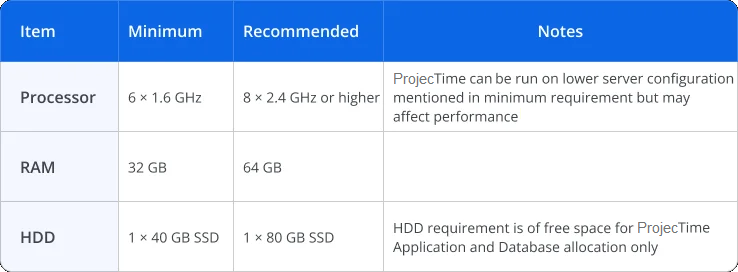
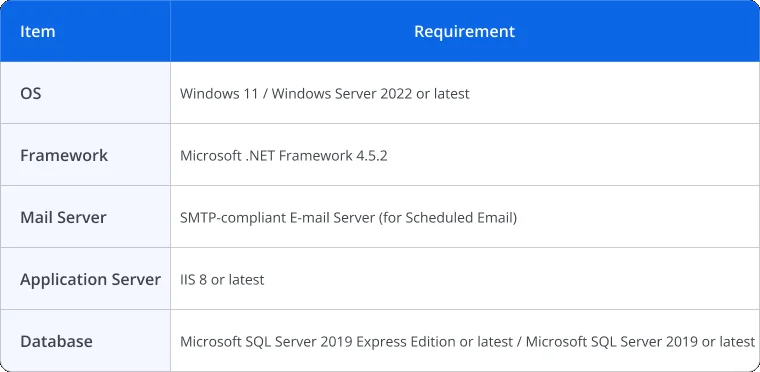
The following sections provide the system requirements for on-premises ProjecTime installation.
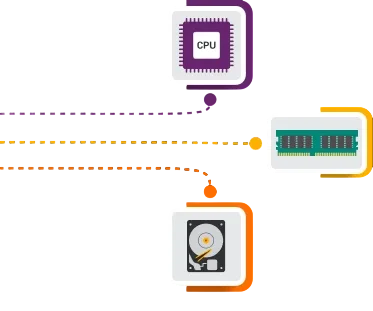
Hardware Requirement:
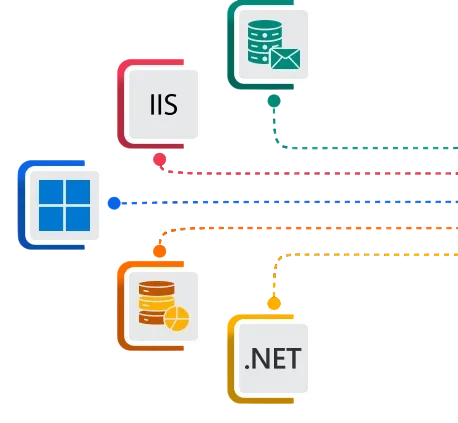
Software Requirement:
Onboarding Process
Hardware Requirements
We first confirm the hardware specifications to ensure smooth installation and operation of TimeLive on-premises version.
Install Prerequisites
The user install all required dependencies and system components listed in the pre requisites.
Download TimeLive Setup Files
Once ready, download the TimeLive setup package provided by our team.
Install ProjecTime
Install ProjecTime using the setup wizard or follow manual installation steps, depending on your server configuration.
Database and Admin Account
Run ProjecTime and complete the initial setup through the web portal to create your database and the first admin account.
Ready To Use
Your on-premises ProjecTime system is now fully functional and ready for your team to start tracking time and managing projects.
Solutions Built for the Industries You Work In

Construction

Legal

Manufacturing

Accounting
Content Library
 DCAA Timekeeping Requirements: A Practical Guide for Government Contractors
If your organization holds a cost-reimbursable, time-and-materials, or labor-hour government contract
 TimeAppz
 Timesheet Reminders: How to Ensure On-Time Submission Every Week
Late timesheet submissions are a management problem before they are an employee
TimeAppz
 Timesheet Approval Process: Best Practices for Teams
A timesheet without an approval is not a reviewed document. It is
TimeAppz
FAQ
Frequently Asked Questions
Find your answers to these frequently asked questions
What is ProjecTime on-premises?
ProjecTime on-premises is the on-premises version of our time tracking software. It allows you to install and manage the entire system on your own server, giving you complete control over data, security, and performance.
|
How do I install ProjecTime on-premises?
Our team provides setup files and documentation. You’ll confirm hardware requirements, install prerequisites, and run the setup wizard to complete installation and database configuration.
|
Can I migrate from the cloud version to on-premises?
Yes. Our support team can help you migrate your existing ProjecTime cloud data to your on-premises environment safely and efficiently.
|
Does the on-premises version require internet access?
No continuous internet connection is required. Once installed and configured, ProjecTime can run entirely within your internal network.
|
Does Timeappz provide technical support for on-premises installations?
Yes. We offer full installation assistance, troubleshooting, and maintenance support for on-premises deployments.
|