

Heading

A timesheet is a record of the hours an employee worked during a specific period. It captures when work started, when it ended, how long breaks lasted, and in many cases which projects, clients, or tasks that time was spent on. Timesheets originated as physical paper documents in factory settings where punch clocks stamped arrival and departure times. Today they are mostly digital, generated by time tracking software, entered through web or mobile apps, or filled out in spreadsheets. The format has changed significantly. The purpose has not: timesheets create an auditable record of labor hours for payroll, client billing, compliance, and resource planning.
This guide covers what a timesheet contains, the different types used by different teams, what timesheets are actually used for, how the approval process works, and what to look for in timesheet software when spreadsheets and paper are no longer sufficient.
What Does a Timesheet Contain?
The specific fields on a timesheet vary depending on the organization and the purpose the timesheet serves, but most timesheets capture the same core information.
| Field | What It Records | Why It Matters |
| Employee name and ID | Who submitted the timesheet | Links hours to a specific person for payroll and accountability |
| Pay period dates | The start and end date of the period being recorded | Aligns the timesheet with the correct payroll cycle |
| Clock-in and clock-out times | When work started and ended each day | The raw data from which total hours are calculated |
| Break periods | Paid and unpaid break durations | Required for accurate overtime calculation and FLSA compliance |
| Total hours per day | Sum of working hours for each date | Enables day-level review before the period totals are approved |
| Project or client codes | Which project or client the time was spent on | Required for billing, cost allocation, and project profitability analysis |
| Billable vs non-billable status | Whether the time can be charged to a client | Separates revenue-generating work from internal overhead |
| Employee sign-off | Employee confirmation that hours are accurate | Creates a personal attestation record, required for DCAA compliance |
| Manager approval | Supervisor review and sign-off before payroll | The final control point before hours are used for pay or billing |
Timesheet vs Time Card: What Is the Difference?
These terms are used interchangeably in everyday conversation but they refer to different things. A time card records clock-in and clock-out for a single shift. It is a single data point. A timesheet aggregates shift data across a full pay period, calculating total hours, overtime, and producing the summary that payroll acts on. Think of it this way: a time card is one entry. A timesheet is the complete record that payroll processes.
|
Simple distinction Time card = a record of one shift or one day. Timesheet = the full pay period record compiled from multiple time entries, reviewed and approved before payroll runs. |
Types Of Timesheets
Daily Timesheet
A daily timesheet captures one employee’s hours for a single day. It records clock-in time, clock-out time, break periods, and a daily total. Daily timesheets provide the highest level of granularity and are used where daily accuracy matters most: shift-based workers, healthcare staff tracking ward hours, contact center agents measured per shift, and any operation where labor costs need to be reviewed day by day rather than weekly. The trade-off is administration volume. A manager approving a daily timesheet for every employee across a team adds up significantly. For most organizations, daily timesheets make sense as a supplemental record for exception tracking rather than the primary format for all employees.
Weekly Timesheet
The weekly timesheet is the most common format. It covers a standard Monday-to-Sunday workweek and totals all hours across that period. It aligns with the Fair Labor Standards Act’s workweek definition, which makes overtime tracking straightforward: any employee who exceeds 40 hours in the week owes overtime, and the weekly total makes that visible before payroll runs. Weekly timesheets work well for most office and remote workers, for teams with regular hours, and for businesses that pay weekly or biweekly. The level of detail is sufficient for most compliance and payroll purposes without the administrative overhead of daily review.
Biweekly Timesheet
Biweekly timesheets cover two weeks and align with biweekly payroll cycles, the most common payroll schedule in the United States. According to the Bureau of Labor Statistics, 43% of private US employers pay employees every two weeks. Biweekly timesheets are a practical compromise between granularity and administrative burden, capturing enough detail for accurate payroll without requiring weekly submission cycles from employees.
Monthly Timesheet
Monthly timesheets record hours across a full calendar month and are most common for salaried employees with standard, predictable schedules and for organizations that run monthly payroll cycles. They are particularly common in Europe. Monthly timesheets are simpler to manage but provide less granularity for identifying overtime, attendance patterns, or project cost overruns in real time.
Project-Based Timesheet
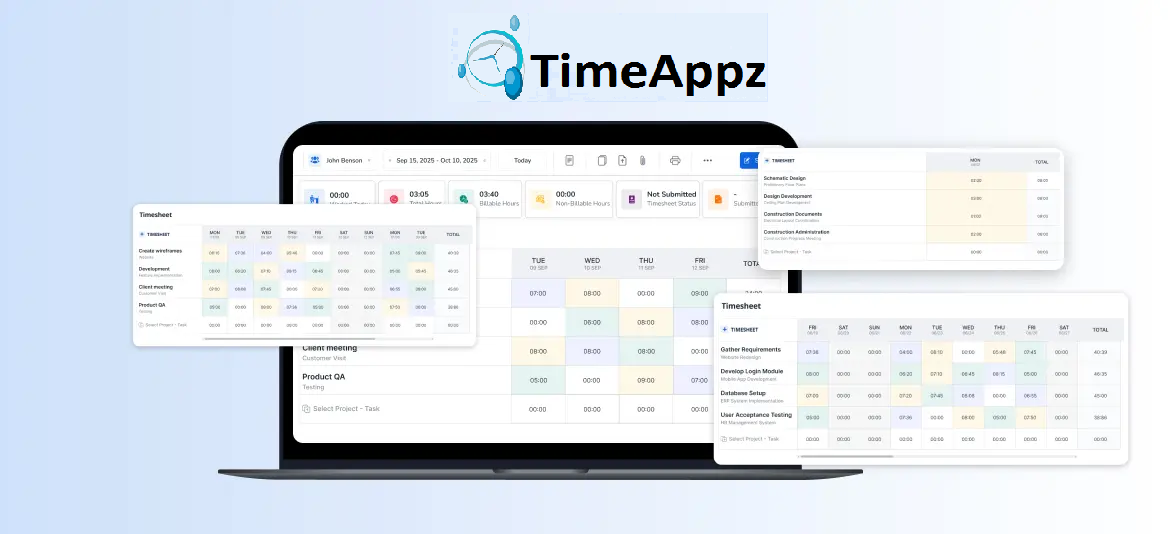
Project-based timesheets track hours by project or client rather than by calendar period. Instead of recording what an employee did on Monday from 9 to 5, a project-based timesheet records that an employee spent 3.5 hours on Client A’s website project and 2 hours on Client B’s strategy document. This format is used by consulting firms, agencies, architecture practices, legal firms, and any business where time directly translates to client invoices. Project-based timesheets feed directly into billing and invoicing software, making them the foundation of the client billing process.
What Are Timesheets Used For?
Timesheets are not just administrative paperwork. They serve as the data source for several critical business functions.
Payroll Processing
This is the most immediate and universal purpose of a timesheet. The approved hours in a timesheet determine how much hourly employees are paid each period. Errors in timesheet data flow directly into payroll errors: overpayment is a financial loss, underpayment creates legal liability under the FLSA. Timesheets connected to payroll tracking software eliminate the manual re-entry step and reduce the error rate significantly.
Client Billing and Invoicing
For professional services firms, the project-based timesheet is the source document for every client invoice. Hours logged against a client project, multiplied by the agreed billing rate, produce the invoice amount. Firms that rely on memory or spreadsheets to reconstruct billable hours before invoicing consistently lose 10 to 15 percent of earned revenue. Time billing software that generates invoices directly from approved timesheets eliminates this loss entirely
Compliance and Legal Record-Keeping
The Fair Labor Standards Act requires employers to maintain accurate records of hours worked and wages paid for non-exempt employees. These records must be kept for a minimum of two years and must be available for inspection. For US government contractors, DCAA compliance imposes additional requirements: daily time entry, timesheet locking after approval, and a documented audit trail for every entry and correction. Timesheets are the primary document produced in wage disputes, overtime audits, and contract compliance reviews.
Project Cost Tracking
Timesheets tracked against projects and tasks give project managers real-time visibility into labor costs as work progresses. A project that has consumed 70 percent of its budgeted hours while only 40 percent of the deliverables are complete is a problem that needs addressing immediately, not at project close. Advanced project management reporting built on timesheet data makes this visibility available in real time rather than retrospectively.
Resource Planning and Capacity Management
Timesheet data over time reveals patterns that inform resource planning. Which team members are consistently at full capacity? Which projects are consuming more time than estimated? Where is non-billable work growing at the expense of revenue-generating hours? The reporting generated from timesheet data answers these questions with actual numbers rather than manager perception.
Performance Analysis
HR and operations teams use timesheet data to analyze how individuals and teams are allocating their working time. Combining timesheet data with attendance records and time off data produces a complete picture of workforce activity that supports workforce planning, contract renewals, and capacity decisions.
How the Timesheet Approval Process Works
A timesheet without an approval is not a reviewed document. It is just a form that exists. The timesheet approval workflow is the control layer between employee entry and payroll or billing action. The standard timesheet workflow follows four stages:
- Hour Logging: Employees record start and end times for each work period, break durations, and project or task attribution. This can be done through a timer running in real time, manual entry at end of day, or calendar integration that pre-populates entries from scheduled events.
- Submission: At the end of the pay period (or daily, for DCAA-compliant teams), the employee reviews their entries and submits the timesheet for manager review. Automated reminders reduce the rate of late or missing submissions.
- Manager Review: The manager checks for missing entries, unapproved overtime, incorrect project attribution, or other discrepancies. The manager either approves the timesheet, moving it to payroll, or returns it to the employee with a note explaining the correction needed.
- Payroll or Billing Action: Approved timesheets feed into payroll processing or client billing. Hours are locked against further editing once approved, creating a reliable record.
Paper, Spreadsheet, or Software: Which Format Is Right?
| Format | Best For | Strengths | Limitations |
| Paper timesheets | Very small teams, simple hourly tracking, industries with no internet access | Simple, no technology required, works anywhere | Error-prone, no real-time visibility, difficult to store, impossible to report on, easy to lose |
| Spreadsheet (Excel or Google Sheets) | Small teams comfortable with formulas, simple weekly tracking without project codes | Low cost, flexible, familiar to most users | Manual data entry errors, no submission or approval enforcement, version control problems, no real-time visibility for managers |
| Time tracking software | Any team that bills clients, tracks projects, needs approvals, or has compliance requirements | Automated calculations, approval workflows, project-level tracking, real-time reporting, integration with payroll and billing, audit trail | Setup time required, subscription cost, learning curve for new users |
For most teams that have moved beyond basic attendance tracking, the limitations of paper and spreadsheet timesheets become the bottleneck. The moment a business needs to track time against projects, generate client invoices from hours, run an approval workflow, or produce compliance documentation, timesheet software is the only format that handles all of it without manual workarounds.
What to Look for in Timesheet Software
Not all timesheet tools serve the same use cases. The right software depends on whether your primary need is payroll accuracy, client billing, compliance documentation, or project tracking. Here is what to evaluate.
- Timer and manual entry. Both methods should be available. Real-time timer capture is more accurate. Manual entry provides flexibility for employees who forget to start a timer.
- Project and client tracking. Project-based timesheet capability is essential for any team that bills clients or tracks labor costs by engagement.
- Billable and non-billable distinction. Every entry should be classifiable at the point of entry so non-billable overhead never appears on client invoices.
- Approval workflow. Timesheet approval routes submitted hours to a manager before payroll or billing action. Returns and corrections should be documented with reason codes.
- Audit trail. Every entry, edit, approval, and rejection should be logged with a timestamp and the identity of who made the action. This is a DCAA compliance requirement and a legal protection in wage disputes.
- Automated reminders and submission rules. Timesheet policies with configurable deadlines and automated reminders reduce late submission rates without manual chasing.
- Direct billing integration. Approved timesheets should generate invoices without re-entry. ProjecTime’s billing feature converts approved timesheets to client invoices directly, with per-client billing rates applied automatically.
- Mobile access. Mobile timesheets matter for employees who are not at a desk: field teams, site visitors, remote workers, and consultants between client meetings.
- Integrations with payroll and accounting. The timesheet should connect directly to payroll processing and accounting tools without manual export and re-import steps.
Which Teams Use Timesheets and How
| Team Type | Primary Timesheet Use | Key Features Needed |
| Consulting firms | Project-based tracking for client billing: every hour against the right client at the right rate | Per-client billing rates, billable distinction, direct invoice generation, DCAA compliance for government contracts |
| Architecture firms | Phase-based project tracking with reimbursable expense capture | Project phases as sub-tasks, multiple billing rates per phase, expense tracking alongside time |
| Healthcare organizations | Shift-based attendance and compliance documentation for nursing and clinical staff | Standalone attendance module, shift scheduling, daily entry, DCAA compliance for government health contracts |
| Marketing and creative agencies | Multi-client time tracking across simultaneous campaigns | Project codes per client, billable distinction, real-time reporting by client and project |
| Freelancers and independent contractors | Accurate hour logging for client invoicing across multiple clients | Timer, project tracking, direct invoicing, mobile app for on-the-go logging |
| Government contractors | DCAA-compliant daily timekeeping with full audit trail | Daily entry requirement, timesheet locking, audit trail, correction documentation with reason codes |
Legal Requirements Around Timesheets
Timesheets have legal weight that is often underestimated until a dispute arises.
- Fair Labor Standards Act (FLSA): Employers must maintain accurate records of hours worked and wages paid for non-exempt employees. No specific form is required but records must be complete, accurate, and available for inspection. Records must be kept for a minimum of two years.
- Overtime: Under the FLSA, non-exempt employees who work more than 40 hours in a workweek are entitled to overtime at 1.5 times their regular pay rate. Accurate timesheets are the data source that identifies overtime before it becomes an underpayment liability.
- DCAA Compliance: US government contractors on cost-reimbursement contracts must follow DCAA timekeeping requirements: daily time entry, supervisor approval, documented corrections with reason codes, and a complete audit trail. DCAA-compliant timekeeping is a contractual requirement, not an optional best practice.
- Wage Disputes: In a wage dispute, the employer’s time records are the primary evidence. Incomplete or inaccurate records shift the burden to the employer. A reliable audit trail makes the employer’s position defensible.
Managing Timesheets With ProjecTime
ProjecTime’s timdesheet feature handles every format and use case covered in this guide: daily and weekly submission cycles, project-based time tracking for billable and non-billable distinction, timesheet approval workflows, DCAA-compliant audit trails, automated reminders, and direct integration with QuickBooks, Xero, and payroll systems. Add payroll systems, time off management, attendance tracking, or advanced project management at $3/user/month and $2/user annually. The free plan includes the full timesheet feature for 3 users and 3 projects. See ProjecTime pricing for full details.
🎯 Future-Proof Your Manufacturing Infrastructure
Relying on legacy clipboards or fragmented spreadsheets leaves your plant vulnerable to severe payroll inflation, manual logging errors, and unmonitored production bottlenecks. ProjecTime by TimeAppz replaces operational guesswork with an automated shop-floor tracking ecosystem. Secure your labor law compliance, protect your job margins, and deploy seamlessly on our ultra-secure cloud framework or run On-Premises behind private corporate network firewalls.
Permanently Free Plan
Perfect for independent workshops or small plants. Supports up to 2 users and 1 project permanently with core timesheets and invoicing included.
Advanced Industrial Plan
Access our 30-Day Full-Feature Trial—no credit card required. Includes real-time plant dashboards, predictive workforce demand forecasting, and native ERP sync.

Related Blogs
 DCAA Timekeeping Requirements: A Practical Guide for Government Contractors
If your organization holds a cost-reimbursable, time-and-materials, or labor-hour government contract
TimeAppz
 Timesheet Reminders: How to Ensure On-Time Submission Every Week
Late timesheet submissions are a management problem before they are an employee
TimeAppz
 Timesheet Approval Process: Best Practices for Teams
A timesheet without an approval is not a reviewed document. It is
TimeAppz