

Timesheet Automation: How to Eliminate Manual Entry for Your Team
Manual timesheet entry is one of the most reliably disliked admin tasks in any workplace. Employees do not want to do it, managers spend time chasing it, and the data that comes out of it is less accurate than it should be because memory is an unreliable source of truth about how time was actually spent.
The good news is that most of what makes timesheet management painful, including forgetting to log time, reconstructing entries from memory, chasing late submissions, and correcting errors before approvals, can be removed from the process through automation. This guide covers the specific automation tools that eliminate manual entry, how they work in practice, and how to set them up inside ProjecTime
What Timesheet Automation Actually Means
Timesheet automation does not mean the software tracks every keystroke or monitors what employees are doing. It means removing the manual steps that cause friction in the timesheet process: the need to remember what you worked on, the need to type entries from scratch, the need to manually chase submissions, and the need for approvals to travel through email chains.
The practical result is that time data enters the system with less human effort, is more accurate because it is captured closer to when the work actually happened, and reaches the approval and billing stage faster and with fewer errors.
There are four distinct automation layers that can be applied to a timesheet workflow. Most teams need two or three of them depending on how their work is structured.
The Four Layers of Timesheet Automation
Layer 1: Calendar Integration (Auto-Populate from Meetings and Events)
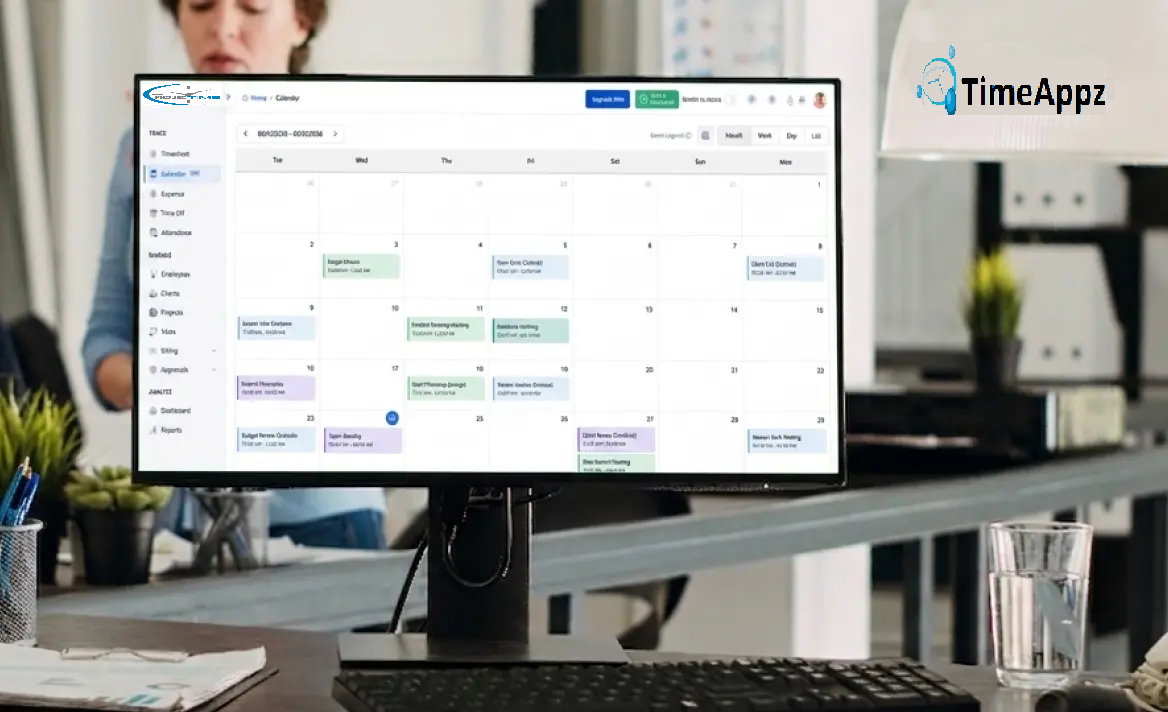
he most common cause of missing or inaccurate time entries is that employees forget to log time for meetings, calls, and scheduled work blocks. Google Calendar and Microsoft Outlook already contain a record of most of what people did during the day. Connecting your calendar to your time tracking system means those events can auto-populate as time entries, removing the need to manually recreate them later.
How it works in ProjecTime: ProjecTime integrates with both Google Calendar and Microsoft Outlook in both directions. Events from your calendar appear as suggested time entries in ProjecTime. You confirm, adjust the duration if needed, and assign the entry to the correct project and client. The entry is created without typing anything from scratch.
|
Practical Example A consultant has four client calls on Tuesday. They are already in Google Calendar. At end of day, ProjecTime shows four suggested entries matching each call, pre-filled with the duration and event title. The consultant assigns each to the correct client project, marks them as billable, and submits. What would have taken 15 minutes of reconstruction from memory takes 90 seconds of confirmation. |
Layer 2: Automated Reminders (Stop Chasing Late Submissions)
Late timesheet submission is a management problem before it is an employee problem. When employees do not have a consistent, reliable prompt to submit their timesheets, submission depends entirely on memory and motivation. Automated reminders remove the need for managers to manually chase and remove the need for employees to remember unprompted.
In ProjecTime, automated reminder notifications are sent to employees who have not submitted their timesheets by a configured deadline. Reminders go out via email and in-app notification. Managers can see at a glance which team members have and have not submitted, without needing to send individual messages. The timesheet policies feature allows deadline configurations to be set per team or per project, so a weekly Friday deadline for one group and a daily deadline for another can run simultaneously without manual management.
The compounding effect of reminders is significant. Teams that implement automated reminders typically see submission rates improve within the first two weeks, not because employees start caring more but because the prompt arrives at the right moment instead of being forgotten entirely.
Layer 3: Scheduled Submission (Auto-Submit on a Cycle)
For teams with predictable, routine work where the same project and task structure repeats every week, automated timesheet submission removes another manual step. Instead of an employee actively clicking submit at the end of each period, the system submits automatically on the configured schedule.
ProjecTime supports automated submission on daily, weekly, and monthly cycles. This is particularly useful for salaried employees with standard hours, administrative staff with routine tasks, and any team where the primary value of the timesheet is attendance and payroll accuracy rather than granular project-level billing. For teams that need DCAA-compliant timekeeping, daily automated submission combined with the review and correction workflow meets the daily entry requirement without manual discipline from each employee.
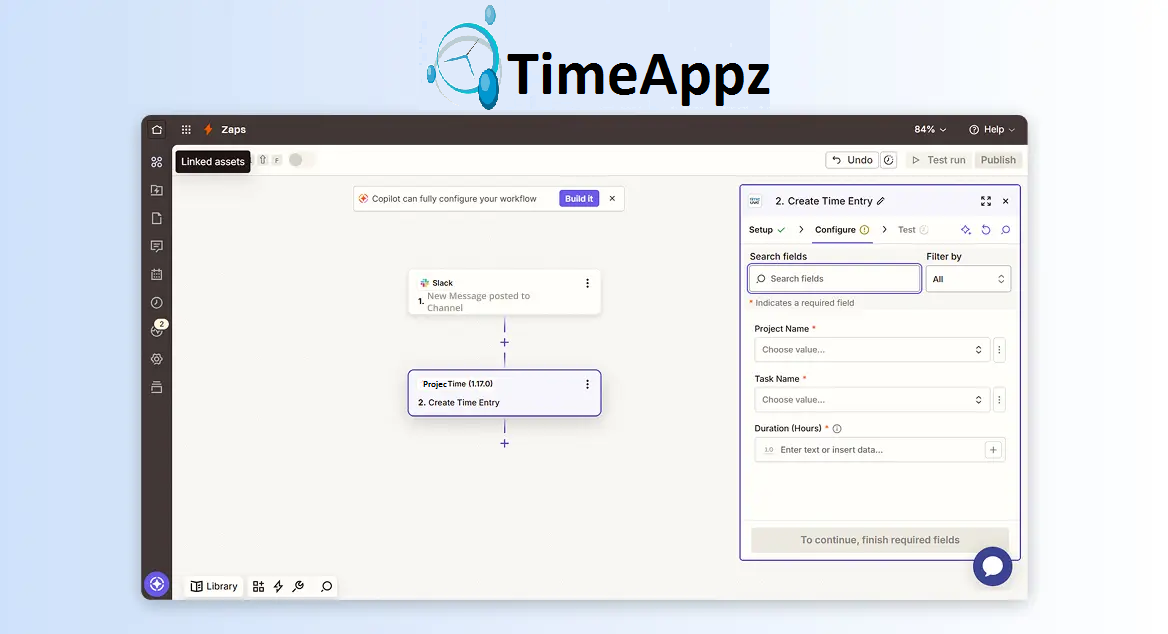
- When a task is marked complete in Asana, log the estimated task duration as a time entry in ProjecTime against the matching project
- When a support ticket is resolved in a helpdesk tool, create a time entry in ProjecTime for the resolution time
- When a calendar event ends in Google Calendar (beyond the native integration), trigger a ProjecTime entry with the event duration and project tag
- When a time entry is approved in ProjecTime, automatically push invoice data to QuickBooks, see: how to transfer ProjecTime timesheets to QuickBooks
Layer 4: Zapier Integration (Trigger Time Entries from Other Tools)
For teams whose work lives in project management tools like Asana, Trello, Jira, or ClickUp, the most powerful automation is one that creates time entries in ProjecTime automatically when actions happen in those tools. Through ProjecTime’s Zapier integration, you can connect any Zapier-supported application to ProjecTime and set up triggers that log time without the employee needing to switch between tools.
Example workflows:
The public API also allows custom automation for teams with development resources, enabling time entries to be created from proprietary internal tools, ERP systems, or custom workflows that Zapier does not cover.
Which Teams Benefit Most From Timesheet Automation
| Team Type | Main Pain Point | Best Automation Layer |
| Consulting firms | Reconstructing billable hours from memory at end of week | Calendar integration to capture client calls and meetings automatically |
| Healthcare teams | Shift workers forgetting to log hours across multiple wards or sites | Automated reminders + scheduled submission on daily cycle |
| Agencies | Multiple client projects running simultaneously, easy to misattribute time | Calendar integration + Zapier triggers from project management tools |
| Architecture firms | Phase-based project tracking across long project timelines | Calendar integration for client meetings + Zapier from project tools |
| Freelancers | Sporadic working hours across multiple clients, manual logging burden | Calendar integration + Zapier from task management apps |
| Government contractors | DCAA daily entry requirement creates admin burden | Scheduled daily submission + automated reminders for same-day compliance |
What Timesheet Automation Does Not Do
It is worth being direct about the limits of timesheet automation so expectations are set correctly.
Background activity tracking, where the software monitors which applications or websites are open and logs time based on computer usage, is a separate category of tool and is not part of ProjecTime’s current automation suite. Tools that do this (screenshot monitoring, keystroke logging, app usage tracking) carry significant employee privacy concerns and are generally more appropriate for remote team monitoring contexts than for timesheet management. ProjecTime’s automation is based on calendar events, scheduled rules, reminders, and integration triggers rather than passive monitoring.
This distinction matters because the goal of timesheet automation for most professional services teams is to reduce the friction of accurate logging, not to surveil employees. The automation layers above achieve that without intrusive monitoring. For teams where granular activity tracking is genuinely needed, that is a separate tool category to evaluate independently of time tracking.
How to Set Up Timesheet Automation in ProjecTime
Setting Up Calendar Integration
Go to Settings in your ProjecTime account and select the Calendar integration option. Connect your Google Calendar or Microsoft Outlook account through the OAuth connection. Once connected, ProjecTime will sync calendar events and display them as suggested time entries on your timesheet. Each suggested entry shows the event title, duration, and date. You select the matching project and client, confirm the entry, and it is added to your timesheet. The integration works in both directions, so time entries logged in ProjecTime can also appear back in your calendar view.
Setting Up Automated Reminders
Go to Timesheet Policies in the administrator settings. Configure the submission deadline (daily, weekly, or custom schedule) and enable automated reminders. Set the timing of reminders: for example, a first reminder 48 hours before the deadline and a second reminder on the deadline day. Reminders go out via email and in-app notification to any employee who has not yet submitted. You can configure separate policies for different teams or departments if submission schedules vary across the organization.
Setting Up Scheduled Auto-Submission
In the Timesheet Policies settings, enable the automated submission rule for the relevant team or user group. Select the schedule: daily, weekly (specify which day), or monthly. Once enabled, timesheets are automatically submitted at the end of each period for employees covered by that policy. Managers can still review and approve submitted timesheets through the standard timesheet approval workflow before hours are used for billing or payroll.
Setting Up Zapier Triggers
Manual timesheet entry has two costs that are easy to measure once you stop accepting them as normal. The first is the time cost: a team of 20 spending an average of 15 minutes per person per day on manual time entry spends 5 hours per day on admin that adds no client value. Over a year that is roughly 1,250 person-hours of pure overhead.
The second cost is accuracy loss. Research on professional services time tracking consistently shows that manual reconstruction of hours at end-of-day or end-of-week results in 10 to 15 percent of billable time being lost. For a consulting firm billing 20 people at an average of $150 per hour, a 10 percent tracking loss across a 48-week year is over $1.4 million in unbilled but earned revenue.
Automation does not eliminate this loss entirely but it reduces it significantly, particularly for the calendar integration layer which captures the most commonly lost time: meetings and calls that are already in the calendar but never make it to a timesheet entry.
The Financial Impact of Eliminating Manual Entry
Manual timesheet entry has two costs that are easy to measure once you stop accepting them as normal. The first is the time cost: a team of 20 spending an average of 15 minutes per person per day on manual time entry spends 5 hours per day on admin that adds no client value. Over a year that is roughly 1,250 person-hours of pure overhead.
The second cost is accuracy loss. Research on professional services time tracking consistently shows that manual reconstruction of hours at end-of-day or end-of-week results in 10 to 15 percent of billable time being lost. For a consulting firm billing 20 people at an average of $150 per hour, a 10 percent tracking loss across a 48-week year is over $1.4 million in unbilled but earned revenue.
What to Look for in a Timesheet Automation Tool
- Calendar integration with Google Calendar and Outlook: the two dominant calendar platforms. Both directions : events populate timesheets and time entries reflect back in the calendar view.
- Configurable automated reminders. Deadline-based, with timing controls so reminders arrive at useful moments rather than all at once.
- Scheduled submission rules. Daily, weekly, monthly cycles to match different team structures and compliance requirements.
- Zapier or API integration. So that time entries can be triggered from the project management, support, or CRM tools teams already use.
- Approval workflow that works alongside automation. Automation speeds up entry but the timesheet approval process still needs to happen before hours reach billing or payroll.
- Audit trail. Every automated entry, reminder, and submission should be logged with a timestamp and the triggering event, particularly for teams with compliance requirements. ProjecTime’s audit trail covers every action in the timesheet workflow.
- Mobile access. For employees who are not at a desk, mobile timesheet access ensures calendar-synced entries and manual additions can be confirmed or adjusted from a phone.
ProjecTime covers all of these. The free plan includes the full timesheet feature for up to 3 users and 3 projects. Calendar integration, automated reminders, scheduled submission, and Zapier connectivity are available alongside the core timesheet module. Add expense tracking, time off management, attendance tracking, or advanced project management at $3 per user per month and $2 per user annually as your team’s needs grow. See the full pricing details.
Reduce the Admin, Keep the Accuracy
Timesheet automation is not about removing human judgment from time tracking. It is about removing the manual steps that make accurate tracking harder than it needs to be. Calendar integration captures the time that gets forgotten. Reminders remove the chasing. Scheduled submission removes the weekly friction. Zapier triggers close the gap between where work happens and where it gets logged.
ProjecTime brings all four automation layers into one platform, alongside billing and invoicing, project management, and DCAA compliance for teams that need it. The result is a timesheet workflow that requires less manual input, produces more accurate data, and reaches approval and billing faster than a manual process ever will.
|
Try ProjecTime Free. Full features on a 30-day trial, no credit card required. Free plan includes timesheet feature for 3 users and 3 projects permanently. |
🎯 Put Your Timesheet Management on Complete Autopilot
Relying on manual human memory to construct administrative records leaves your organization exposed to severe revenue leakage, inaccurate client billing, and delayed payroll cycles. ProjecTime by TimeAppz eliminates the friction by bridging the gap between your team’s actual work stack and your financial ledger. Streamline your operations, satisfy audit oversight parameters, and run securely on our optimized cloud or deploy On-Premises behind private corporate networks.
Permanently Free Plan
Perfect for small teams or independent operators. Includes core timesheets, billing, and support for up to 2 users and 1 project permanently.
Advanced Automation Trial
Unlock our 30-Day Full-Feature Trial—no credit card required. Experience multi-layer calendar syncing, automated webhooks, custom approval gateways, and native Zapier integration.

Related Blogs
 DCAA Timekeeping Requirements: A Practical Guide for Government Contractors
If your organization holds a cost-reimbursable, time-and-materials, or labor-hour government contract
TimeAppz
 Timesheet Reminders: How to Ensure On-Time Submission Every Week
Late timesheet submissions are a management problem before they are an employee
TimeAppz
 Timesheet Approval Process: Best Practices for Teams
A timesheet without an approval is not a reviewed document. It is
TimeAppz