

Timesheet Approval Process: Best Practices for Teams

A timesheet without an approval is not a reviewed document. It is just a form that exists. The approval step is what transforms raw time entries into a verified record that payroll, billing, and compliance processes can rely on. Without it, errors flow unchecked into invoices, overtime goes unreviewed, and there is no documented confirmation that the hours claimed accurately reflect the work done. Getting the timesheet approval process right is one of the most operationally significant things a team can do, and one of the most consistently mismanaged. This guide covers how the approval process works, the common failure points, best practices for different team structures, and how to configure an approval workflow in ProjecTime that handles everything from single-level manager review to multi-level compliance approval.
What the Timesheet Approval Process Involves
The timesheet approval process is the review and sign-off workflow that happens between an employee submitting their time entries and those entries being used for payroll or client billing. It is the quality control layer of the timesheet lifecycle. A well-designed approval process does four things:
- Catches errors before they reach payroll or client invoices
- Creates a documented record of who reviewed and approved what, and when
- Gives employees a mechanism to receive corrections with clear reasons rather than silent edits
- Locks approved timesheets against further changes so the approved record remains the authoritative version
Each of these is distinct from simply having someone glance at a spreadsheet before payroll runs. A genuine approval process has structure, accountability, and a documented trail. In ProjecTime, timesheet approval covers all four functions with a configurable workflow that adapts to single-manager, project-manager, or multi-level approval structures.
The Standard Timesheet Approval Workflow
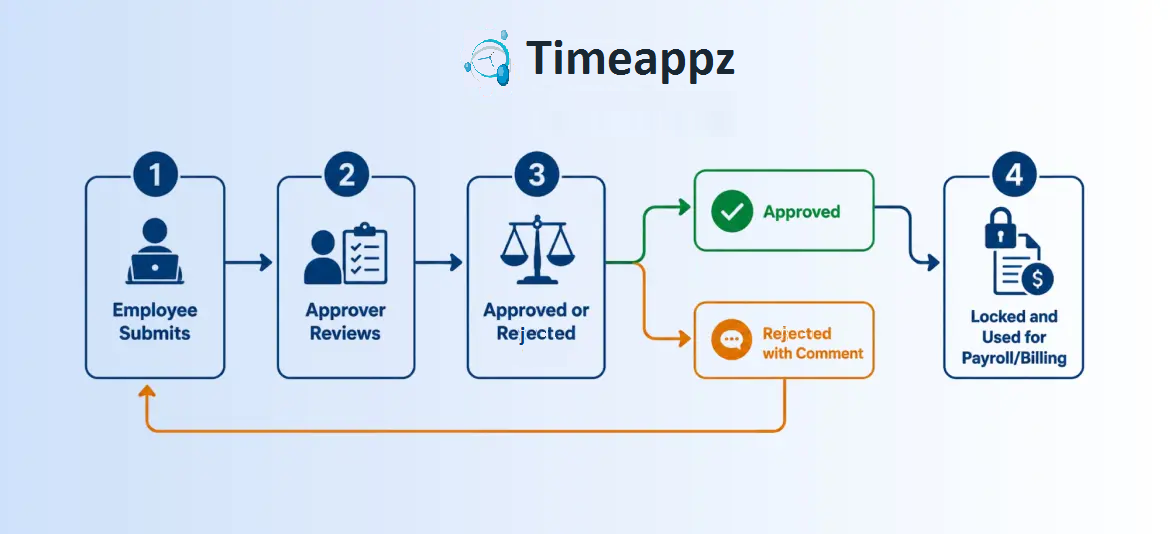
Stage 1: Employee Submits
The employee completes their time entries for the period, reviews them for accuracy, and submits. In ProjecTime, time entries can be submitted for a full period at once or individual entries can be submitted as they are completed. At this stage the employee is attesting that the hours recorded accurately reflect the work done, which is a personal sign-off required for DCAA compliance on government contract work.
Stage 2: Approver Receives and Reviews
In ProjecTime the approver can be configured per team, per project, or per individual. A direct manager, a project manager, a department head, or a finance administrator can all be designated as approvers depending on the organization’s structure. The approver reviews each entry for: correct project and client attribution, accurate duration, appropriate billable or non-billable classification, and any missing entries that need to be added before the period closes. ProjecTime allows approvers to review and act on individual time entries rather than only the full timesheet at once. This means an approver can approve most entries while flagging one specific entry for correction, without holding up the rest of the timesheet. This is particularly useful for teams where some entries are straightforward and one or two need clarification.
Stage 3: Approved or Returned
If the timesheet is accurate, the approver approves it and it moves to payroll or billing. If there are issues, the approver returns the timesheet to the employee with a specific comment explaining what needs to be corrected. The employee addresses the correction and resubmits. This exchange is documented in the audit trail. Returning with a comment rather than silently editing the timesheet matters for two reasons. First, it preserves data integrity by keeping the employee as the author of their own time record. Second, it creates a correction loop that is documented and reviewable, which is a specific requirement of DCAA-compliant timekeeping. A correction made silently by a manager without documentation is not compliant.
Stage 4: Approved and Locked
Once approved, ProjecTime automatically locks the timesheet. No further edits can be made to approved entries without going through the correction and re-approval process. This lock is what makes the approved timesheet a reliable source of truth for payroll processing and client billing. An unlocked approved timesheet is a contradiction in terms, the approval is only meaningful if the document cannot be changed after the fact.
Single-Level vs Multi-Level Approval: Which Does Your Team Need?
- Small teams where one manager has full visibility over everyone’s work
- Freelancers who submit to a single client contact for approval
- Teams where all time is tracked against one project or one client and there is no billing split
- Administrative and support staff whose timesheets go to a single department head
Single-Level Approval
The simplest and most common structure. One designated approver reviews and signs off on each timesheet before it moves to payroll or billing. Works well for:
- Project manager approves first (checking project and task attribution), then finance approves second (checking billable hours and rates before invoicing)
- Team lead approves first (checking daily entries for accuracy), then HR approves second (checking overtime and compliance before payroll)
- Department head approves first, then a DCAA compliance officer reviews the audit trail before government contract billing is finalized
Multi-Level Approval
For more complex organizations, a single approver is not sufficient. ProjecTime supports multi-level approval workflows where a timesheet passes through more than one approval stage before it is finalized. Common configurations include:
|
When to use multi-level approval Use multi-level approval when different people need to verify different aspects of the same timesheet. Project accuracy and billing accuracy are two different reviews. Combining them into one approval step either overloads one person or results in neither being done thoroughly. |
Best Practices for the Timesheet Approval Process
1. Configure the Approver to Match How Work Is Actually Organized
The most common approval workflow failure is configuring all timesheets to go to the same person regardless of which project or team the employee works on. In ProjecTime’s configurable approval settings, approvers can be set per project, per team, or per individual. A consultant working across three client projects can have three different project managers as approvers for the relevant entries. This means the right person is reviewing each set of hours rather than one generalist reviewing everything.
Approval cannot happen until submission happens. Set a firm submission deadline and configure automated reminders to fire before it. In ProjecTime, timesheet policies allow deadline configuration per team alongside automated reminder notifications for employees who have not yet submitted. Communicate the deadline explicitly during onboarding so it is not a surprise when the reminder arrives. The most common cause of delayed approvals is delayed submissions.
3. Approve or Return Within 24 Hours of Submission
A submitted timesheet sitting in an approval queue for a week defeats the purpose of real-time tracking. Set an internal standard that approvers respond within 24 hours of receiving a timesheet, either approving it or returning it with a specific comment. This keeps the correction loop fast enough that employees can fix issues while the work is still fresh in memory.
4. Always Return With a Specific Comment, Never Edit Silently
When an entry needs correction, return the timesheet with a comment that identifies exactly what needs to change and why. Do not edit the entry directly on behalf of the employee. Silent edits undermine data integrity, remove the employee’s ability to learn from the correction, and create compliance problems for any team operating under DCAA requirements where the reason for every change must be documented.
5. Use Individual Entry Approval for Complex Timesheets
For timesheets with many entries across multiple projects and clients, approving individual entries rather than the full timesheet at once gives approvers the ability to approve what is correct immediately while flagging what needs correction. ProjecTime supports both full-timesheet approval and individual entry approval. For teams where most entries in a timesheet are straightforward and one or two regularly need adjustment, individual entry approval significantly reduces how often a full timesheet needs to be returned and resubmitted.
6. Lock Timesheets After Approval Without Exception
Once a timesheet is approved it should lock automatically with no exceptions. ProjecTime does this automatically on approval. Any subsequent change should require the timesheet to be reopened, corrected, and re-approved, with every step logged in the audit trail. The moment an organization allows post-approval edits without a documented correction process, the integrity of the approved record is gone and the organization’s ability to defend its records in a wage dispute or compliance review is compromised.
7. Review the Audit Trail Periodically
The audit trail records every submission, approval, rejection, correction, and edit with a timestamp and the identity of who made each action. Make it a monthly practice to review the audit trail for patterns: which employees submit late consistently, which projects generate the most correction loops, which approvers take the longest to respond. These patterns reveal where the approval process is breaking down before they become payroll or billing errors.
How Different Teams Structure Their Approval Process
| Team Type | Approval Structure | Who Approves | Key Requirement |
| Consulting firms | Single or multi-level | Project manager first, billing manager second for invoicing | Correct client and project attribution before billing |
| Architecture firms | Single or multi-level | Project lead first, finance second for phase billing | Phase-based accuracy before phase invoices are generated |
| Healthcare teams | Multi-level | Department head first, HR second for overtime and compliance | Daily entry compliance, shift accuracy, overtime review |
| Agencies | Single-level | Account manager or project lead | Client project attribution and billable hour accuracy |
| Freelancers | Single-level | Client contact | Billable hours confirmed before invoice is sent |
| Government contractors | Multi-level | Project manager first, compliance officer second | DCAA daily entry, audit trail documentation, reason codes on corrections |
Common Approval Process Failures and How to Fix Them
Failure: One Approver for the Entire Organization
When all timesheets route to the same person regardless of which team or project they cover, that person becomes the bottleneck and cannot review entries with the project-level context needed to catch attribution errors. Fix: configure approvers per project or per team in ProjecTime so the right person reviews each set of hours.
Failure: No Deadline, No Reminders
Without a published submission deadline and automated reminders, submission timing is inconsistent and approval is always playing catch-up. Fix: set a firm deadline in ProjecTime’s policies settings and configure automated reminders to fire 48 hours before and on the deadline day.
Failure: Silent Edits by Approvers
Approvers who edit time entries directly rather than returning them to the employee create records that reflect the approver’s judgment rather than the employee’s actual work, with no documented reason for the change. Fix: enforce the return-with-comment rule. If an entry is wrong, return the timesheet and require the employee to make the correction.
Failure: Approval Without Locking
If approved timesheets can be edited after approval without re-approval, the approval becomes meaningless. Fix: ensure timesheet locking on approval is enabled. ProjecTime locks approved timesheets automatically. Any post-approval correction requires reopening, editing, and re-approval, all logged in the audit trail.
Failure: No Audit Trail
An approval process without a documented audit trail cannot be defended in a wage dispute, compliance review, or DCAA audit. Fix: use a platform that maintains a complete audit trail automatically. Every action in ProjecTime’s approval workflow is logged with a timestamp and user identity without any manual documentation required.
Timesheet Approval and DCAA Compliance
For US government contractors, the timesheet approval process is not an operational preference. It is a contractual requirement. DCAA-compliant timekeeping specifies that:
- Employees must enter time daily, not reconstructed at end of week
- Supervisors must review and approve timesheets before they are finalized for billing
- Corrections must be documented with a reason code and the identity of who made the change
- The original entry must remain visible alongside the correction in the audit trail
- Approved timesheets must be locked against further change without documented re-approval
Every one of these requirements is met by ProjecTime’s approval workflow out of the box. The configurable approver structure, individual entry approval, return-with-comment functionality, automatic locking on approval, and complete audit trail together constitute a DCAA-compliant approval process without supplementary tools or manual documentation.
Approval for Expenses and Time Off: Keeping It Consistent
Teams that use a timesheet approval process for hours should apply the same structure to expense approvals and time off approvals. Inconsistent approval practices across different record types create gaps that can cause billing errors (an expense submitted but never approved appearing on an invoice) or compliance issues (time off taken without documented approval). ProjecTime applies the same configurable, multi-level, audit-trailed approval workflow to timesheets, expense sheets, and time off requests. A team that sets up timesheet approval correctly gets a consistent approval framework across all three record types without separate configuration.
Set Up a Reliable Timesheet Approval Process in ProjecTime
ProjecTime’s timesheet approval feature is fully configurable: designate approvers per project, team, or individual; approve full timesheets or individual entries; return with documented comments; lock automatically on approval; and maintain a complete audit trail for every action. Multi-level approval supports project manager and finance or compliance sign-off in sequence. DCAA-compliant timekeeping requirements are met without supplementary tools. The free plan includes the full timesheet feature and approval workflow for 3 users and 3 projects. Add expense tracking with expense approval, time off management with time off approval, advanced project management, and payroll integration at $3/user/month and $2/user annually. See ProjecTime pricing for full details.
🎯 Future-Proof Your Institutional Project Delivery and Profitability
Relying on separate single-feature task tools, disjointed spreadsheets, or fragmented emails to run your operations is a severe corporate liability that directly causes scope creep, missed deadlines, and unbilled labor leakage. ProjecTime by TimeAppz replaces operational chaos with a unified, high-velocity project execution ecosystem. Take absolute control of your organizational throughput, deploy safely on our optimized cloud, or run completely On-Premises behind private company firewalls.
Permanently Free Plan
Tailor-made for independent professional teams and early-stage agencies. Holds core timesheets, baseline billing features, and support for up to 2 users and 1 project permanently.
Advanced Institutional PMO Plan
Unlock our 30-Day Full-Feature Trial—no credit card required. Gain real-time project dashboards, automated cross-department reporting data, multi-currency processing, and native accounting ledger integrations.

Related Blogs
 DCAA Timekeeping Requirements: A Practical Guide for Government Contractors
If your organization holds a cost-reimbursable, time-and-materials, or labor-hour government contract
TimeAppz
 Timesheet Reminders: How to Ensure On-Time Submission Every Week
Late timesheet submissions are a management problem before they are an employee
TimeAppz
Timesheet Approval Process: Best Practices for Teams
A timesheet without an approval is not a reviewed document. It is
TimeAppz