

How to Track Billable Hours as a Consultant Using Time Tracking Software
Consultants lose money every single day, and not because they are not working, but because they are not tracking. Research consistently shows that professionals who rely on memory or end-of-day estimates lose between 10 and 15 percent of their billable time before they ever send an invoice. For a consultant billing at $150 per hour, that is hundreds of dollars disappearing every week without a client ever disputing a charge.
The problem is not willingness. Most consultants want to bill accurately and fairly. The problem is process. Without a structured system for capturing time as it happens, reconstruction replaces recording. And reconstruction is always imprecise.
This guide covers everything: what billable hours are, why consultants consistently underbill, how to set your billing rate, how to use time tracking software for consultants to capture every minute, how billing increments work, what to look for when choosing a tool, and how to use your tracking data to build a more profitable practice.
What Are Billable Hours for Consultants?
Billable hours are any hours spent on work that can legitimately be charged to a client. For consultants this is broader than most people assume. It includes direct client work: strategy sessions, analysis, research, deliverable preparation, presentations, and reporting. But it also includes activities that many consultants routinely absorb as overhead without realising they should be billing for them.
Tasks that are billable but frequently missed:
- Brief client emails and follow-up messages: if you are writing about a client’s project, that time is billable
- Short phone calls: a ten-minute check-in call is still work performed for the client
- Document review: reading materials the client sends before a meeting
- Travel time to client locations, depending on your engagement terms
- Meeting preparation: research and agenda preparation before a client call
- Revision cycles: if a client requests changes to a deliverable, that revision time is billable
Not all working hours are billable. Time spent on business development, proposals, internal administration, professional development, and internal meetings is non-billable. The ratio between billable and non-billable hours is called your utilization rate, one of the most important metrics in consulting. The timesheet feature in ProjecTime tracks both categories separately, giving you your real utilization rate at any point in the month.
Why Consultants Consistently Lose Billable Hours
Understanding the root causes of underbilling is the starting point for fixing it. There are four main reasons consultants leave money on the table.
Reconstruction Instead of Recording
The most expensive habit in consulting is filling out timesheets at the end of the day, or worse, at the end of the week. Research on creative professionals found that some practitioners reconstruct a full month of time entries at once and describe it as guesswork. When you reconstruct rather than record, short tasks disappear entirely, durations get underestimated, and the cumulative loss compounds every month.
The fix is real-time logging. ProjecTime’s built-in timer lets you start and stop tracking as you work. The habit becomes automatic within two weeks and the financial return is immediate.
Cutting Time Preemptively
New consultants often reduce their billed time out of discomfort. They worry hours will seem unreasonable, or feel a task took longer than it should have. This is a mistake. Log the actual duration and let the billing review process determine whether adjustments are needed. It is far easier for a supervisor to reduce hours than to recover time that was never recorded.
Inconsistent Tracking Systems
Consultants who track some work in a spreadsheet, some on paper, and some not at all end up with fragmented records that are impossible to reconcile at invoice time. The audit trail ProjecTime maintains for every entry means you can produce clear documentation for any charge instantly which matters the moment a client questions an invoice.
Not Tracking Non-Billable Time
Failing to track non-billable time also costs money. If you do not know how much time you spend on proposals, admin, and internal meetings, you cannot calculate your true utilization rate, cannot identify where non-billable time is excessive, and cannot benchmark your practice against industry standards. Track everything, both billable and non-billable, and mark the distinction clearly.
How to Set Your Billing Rate Correctly
Before you can track billable hours accurately, you need to know what those hours are worth. Many consultants undercharge, particularly when starting out, from underestimating the true cost of delivering their services.
Calculate Your Cost Rate First
Your cost rate is the minimum hourly rate you need to cover costs and pay yourself a sustainable income. Take your desired annual income, add operating costs (software, insurance, equipment, professional memberships, marketing), add a buffer for non-billable time, and divide by your target billable hours for the year.
Cost Rate FormulaCost Rate = (Desired Annual Income + Operating Costs) ÷ Target Billable Hours Example: $120,000 income + $20,000 operating costs = $140,000 ÷ 1,200 billable hours = $116.67/hour minimum. Your actual rate should be higher to account for unpredictability. |
Benchmark Against Industry Rates
Your cost rate sets the floor. Market rates set the ceiling. Research from Promethean Research places the standard hourly rate for digital agency and consulting professionals in the $175 to $199 range. Management consultants at established firms often bill between $200 and $500 per hour. Independent IT consultants typically range from $100 to $250 depending on specialisation.
Review your rates annually. As expertise and client reputation grow, your rates should reflect that increased value.
Set Different Rates for Different Clients and Projects
Not all client work is the same. A strategy engagement with a large enterprise client justifies a higher rate than ongoing operational support for a small business. ProjecTime’s project and client management allows you to set individual billing rates per client and per project, so the correct rate is applied automatically when you generate invoices with no manual rate lookup needed.
How to Track Billable Hours as a Consultant: Step by Step
Step 1: Structure Your Projects and Clients Before You Start
Set up your time tracking tool to mirror how your practice works. In ProjecTime, create a separate project for each client engagement and configure the billing rate for that project. The project management feature keeps every time entry attributed to the correct client and engagement automatically. This setup takes thirty minutes once and saves hours of invoice reconciliation every month.
Step 2: Use the Timer as Your Primary Recording Method
Start the timer when a task begins and stop it when you finish. ProjecTime’s built-in timer is available on desktop and through the mobile app. For consultants who switch between tasks frequently, even brief activities such as a ten-minute client email, a fifteen-minute document review, or a twenty-minute check-in call get captured and attributed to the correct client and project automatically.
If you miss a timer start, manual time entry is available alongside the timer on the same platform. Add entries for any period and assign them to the correct project, keeping records complete regardless of which method you used for any individual task.
Step 3: Mark Every Entry as Billable or Non-Billable at Point of Entry
Do not rely on filtering at invoice time. Mark each entry as billable or non-billable the moment you create it. ProjecTime allows you to set this per entry and also configure projects as billable or non-billable by default, reducing the decision to zero for straightforward engagements. Both categories flow into your utilization and billing reports automatically.
Step 4: Review Entries Daily, Not Weekly
Spend five minutes at the end of each working day reviewing your time entries. Check that every task is attributed to the correct project, billable and non-billable entries are marked correctly, and nothing is missing. This daily review catches errors while the day is fresh and prevents the end-of-week scramble that leads to imprecise records.
Step 5: Submit Timesheets for Approval
For consultants working within firms or on engagements where billing requires sign-off, ProjecTime includes a timesheet approval workflow. Submitted hours are reviewed by a manager before invoicing. This creates an audit trail, catches errors before they reach clients, and is a requirement for government consulting work under DCAA compliance standards.
ProjecTimee’s DCAA-compliant timekeeping is built into the platform. Government contractors and consultants on federal engagements can meet timekeeping requirements without a separate compliance tool.
Step 6: Generate the Invoice Directly from Tracked Hours
Once hours are approved, ProjecTime converts them into a client invoice through the billing and invoicing feature. The software applies the project billing rate, calculates the total, and produces a detailed invoice showing task breakdown and time. There is no manual calculation involved. For consultants using QuickBooks or Xero, see the guide on transferring ProjecTime timesheets to QuickBooks. If you use other tools, ProjecTime connects to hundreds of applications. See how to connect connect ProjecTime with apps via Zapier
Billing Increments: How Precise Should You Be?
How you divide time into billing units directly affects how much you earn. Consultants in legal, financial, and professional services typically bill in one of two increment systems.
Six-Minute Increments (0.1 Hour Units)
Six-minute billing divides each hour into ten equal units of 0.1 hours. This is the standard in legal consulting and common in accountancy and financial advisory. It captures short tasks with precision and minimizes rounding losses.
| Time Spent | In 6-Min Increments | Decimal Hours | At $200/hr |
| 6 minutes | 1 increment | 0.1 | $20.00 |
| 12 minutes | 2 increments | 0.2 | $40.00 |
| 18 minutes | 3 increments | 0.3 | $60.00 |
| 24 minutes | 4 increments | 0.4 | $80.00 |
| 30 minutes | 5 increments | 0.5 | $100.00 |
| 45 minutes | 8 increments | 0.8 | $160.00 |
| 1 hour | 10 increments | 1.0 | $200.00 |
| 1 hr 18 mins | 13 increments | 1.3 | $260.00 |
Fifteen-Minute Increments (0.25 Hour Units)
Fifteen-minute billing divides each hour into four units of 0.25 hours. It is simpler to apply and common in management consulting, IT consulting, and professional services where tasks tend to be longer.
| Time Spent | In 15-Min Increments | Decimal Hours | At $200/hr |
| 15 minutes | 1 increment | 0.25 | $50.00 |
| 30 minutes | 2 increments | 0.50 | $100.00 |
| 45 minutes | 3 increments | 0.75 | $150.00 |
| 1 hour | 4 increments | 1.00 | $200.00 |
| 1 hr 15 mins | 5 increments | 1.25 | $250.00 |
| 1 hr 30 mins | 6 increments | 1.50 | $300.00 |
How to Use Your Tracking Data to Improve Profitability
Tracking billable hours is not just an invoicing exercise. The data you collect is one of the most valuable management tools available to a consulting practice.
Calculate and Monitor Your Utilization Rate
Your utilization rate is the percentage of total working hours that are billable:
Utilization Rate FormulaUtilization Rate = (Billable Hours ÷ Total Working Hours) × 100 Example: 34 billable hours out of 45 total hours = (34 ÷ 45) × 100 = 75.6% Industry benchmark for independent consultants: 70–80%. Firm consultants: 75–85%. |
A utilization rate below 60 percent means more than a third of your working time generates no revenue. Rates consistently above 85 percent can signal that client development and professional learning are being squeezed, which has long-term costs even if short-term revenue looks strong./p>
Analyse Profitability by Client
Not all clients are equally profitable. A client who pays a high hourly rate but generates constant revision requests, lengthy disputes, and scope changes may be less profitable than a straightforward lower-rate client. ProjecTime’s billing reports show total hours, total billable value, and the ratio of billable to non-billable time per client. This data sometimes reveals that clients who feel like good business are actually consuming time that would generate more value elsewhere.
Build Client-Facing Time Transparency
Sharing time records with clients builds trust and prevents disputes before they happen. Rather than a lump-sum invoice, provide a breakdown of tasks, time spent, and corresponding charges. Clients who see exactly what was done and when are far less likely to question a charge. ProjecTime’s reporting generates client-facing time summaries showing work performed without exposing internal notes or non-billable activity.
Build More Accurate Project Estimates
Historical time data from ProjecTime’s project management is the most reliable basis for estimating future engagements. If five similar strategy projects each took between 28 and 35 hours, anchor your next estimate to that range, not to optimistic assumptions. Consultants who track consistently find that estimates improve significantly over time, reducing scope creep and underpricing problems that erode profitability.
What to Look for in Time Tracking Software for Consultants
The market has dozens of time tracking tools. Most were built for agencies, software teams, or general business use, not specifically for how consultants work. Here are the capabilities that matter most. For a full overview of available features, see the ProjecTime features page.
- Per-client and per-project billing rates. You bill different clients at different rates. The software must apply the correct rate automatically. ProjecTime’s billing feature supports individual rates per client and per project.
- Real-time timer with mobile support. Start and stop ProjecTime’s timer from desktop or phone. If mobile tracking is clunky, you fall back to end-of-day reconstruction.
- Billable and non-billable distinction. Every entry should be marked at point of entry. ProjecTime’s timesheet tracks both and gives you your utilization rate in real time.
- Direct invoice generation. The tool should produce a client invoice from tracked hours in one step. ProjecTime’s billing and invoicing converts approved timesheets to invoices automatically.
- Timesheet approval workflow. ProjecTime’s timesheet approval routes submitted hours to a manager for review before billing, which is essential for firms and government engagements.
- DCAA compliance. Government contractors must meet DCAA timekeeping standards. ProjecTime’s DCAA compliance is built into the platform, including audit trail, correctable entries with documentation, and daily entry requirements.
- Accounting integration. Connect to QuickBooks Desktop, QuickBooks Online, or Xero directly. See: ProjecTime QuickBooks integration and connecting via Zapier.
- Expense tracking. Consultants frequently incur reimbursable expenses. ProjecTime’s expense tracking handles both time and expenses in one platform.
ProjecTime covers all of the above. The free plan includes the full timesheet feature for up to three users and three projects. For practices that need expense tracking, time off management, attendance management, or advanced project management, each module is available at $3 per user per month and $2.user annually. See full details on the ProjecTime pricing page.
The Financial Case for Tracking Every Minute
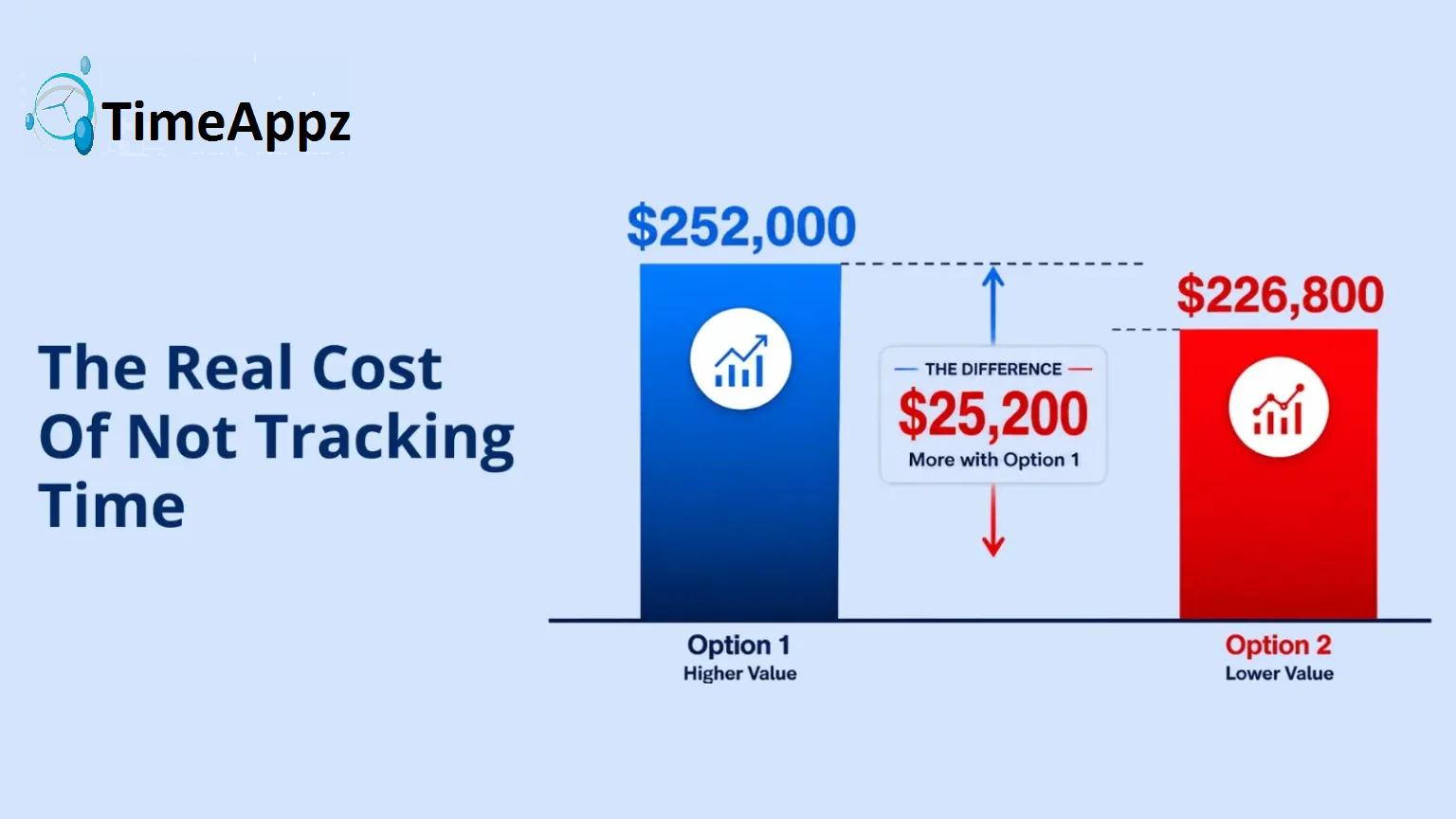
Consider two consultants with identical skills and clients, both billing at $175 per hour and working 45 hours per week. See also: how time tracking helps consultants stay profitable.
| Consultant A — Real-Time Tracking | Consultant B — End-of-Day Reconstruction | |
| Billable hours per week | 30 hours captured | 27 hours captured (10% loss) |
| Billable hours per year | 1,440 hours | 1,296 hours |
| Annual revenue at $175/hr | $252,000 | $226,800 |
| Revenue lost to tracking gaps | — | $25,200 per year |
| Cost of time tracking software | ~$480/year | — |
| Net annual difference | — | $24,720 per year lost |
A 10 percent tracking loss is conservative. Some studies put the true figure closer to 15 percent. The cost of time tracking software is recovered in the first few days of accurate use.
Practical Habits That Make Time Tracking Work Long-Term
Software is only as useful as the habits built around it. These practices, combined with mobile timesheet capabilities, separate consultants who track effectively from those who intend to but do not.
- Start the timer before you open the document, not after you finish the task. The few seconds it takes to start the timer is worth more than trying to remember the duration retrospectively.
- Track during client calls, not after. If you are on a call about a client’s project, the call is billable. Start the timer when the call begins.
- Do not pause the timer for minor interruptions. If you are engaged in focused client work and a brief interruption occurs, continue timing. The interruption is part of the working session.
- Log non-work breaks explicitly as non-billable so they appear in your records and confirm you are not billing personal time.
- Set a daily end-of-day reminder to review and complete time entries. Five minutes at day end eliminates thirty minutes of reconstruction at week end.
- Never cut time preemptively. Log the actual duration and let the billing review process determine whether adjustments are appropriate.
Start Tracking Billable Hours More Accurately
ProjecTime gives consultants a complete time tracking and billing platform with real-time timer on desktop and mobile, per-client billing rates, billable and non-billable distinction, timesheet approval workflow, DCAA compliance, automated invoice generation, and direct integration with QuickBooks and Xero.
The free plan includes the full timesheet feature for up to three users and three projects. Add expense tracking, attendance management, time off management, and advanced project management at $3 per user per month and $2/user annually as your practice grows.
⚡ Unified Workforce Management: Project Time Tracking, Expense Reports, and GPS-Geofenced Attendance
Stop paying for separate software modules. Experience the power of ProjecTime by TimeAppz risk-free with our 30-Day Full-Feature Trial—no credit card required. Scaling down or running a small team? Switch to our Permanently Free Plan, which includes core timesheets, billing, and invoicing capabilities for up to 3 users and 3 projects forever.

Related Blogs
 DCAA Timekeeping Requirements: A Practical Guide for Government Contractors
If your organization holds a cost-reimbursable, time-and-materials, or labor-hour government contract
TimeAppz
 Timesheet Reminders: How to Ensure On-Time Submission Every Week
Late timesheet submissions are a management problem before they are an employee
TimeAppz
 Timesheet Approval Process: Best Practices for Teams
A timesheet without an approval is not a reviewed document. It is
TimeAppz