

Capital Optimization via Advanced Capacity Planning: Eliminating Schedule Drift and Overtime Capital Leakage
What is a work schedule tracker?
A work schedule tracker is a digital tool that helps you plan:
- Who works on what task?
- When they work.
- How long do tasks last in real life?
This means fewer paper schedules or static spreadsheets, and more real-time visibility into attendance, hours, and project workloads across teams.
Modern trackers, such as ProjecTime by Timeappz, go beyond basic calendars. They combine:
- Employee time tracking and digital timesheets for daily work hours.
- Project scheduling and resource planning to assign shifts and tasks.
- Leave, PTO, and holiday management to avoid conflict.
- Reporting and analytics help understand where time is spent and which work is valuable.
ProjecTime by Timeappz is designed with an all-in-one approach, helping teams move from manual tracking to an integrated scheduling system.
Ready to Organize Your Team’s Schedule in Real Time?
See how ProjecTime by Timeappz helps you plan shifts, track time, prevent overload, and improve productivity all in one unified platform.
Why Your Team Needs a Work Schedule Tracker
A good work schedule tracker solves problems that affect productivity. This can be noted as unclear priorities, double bookings, or endless status checks.
When time is tracked consistently and schedules are visible, managers can make clear decisions, and employees understand their focus.
Key benefits:
Workloads are clearly laid out
-
Managers can observe full bookings, those with capacity, and where deadlines are at risk, before they turn to emergencies.
Accurate time data
- Digital timesheets and real-time tracking record billable and non-billable hours without guesswork.
Improved staffing decisions
- With real-time visibility into overtime and utilization, teams can maintain balance with shifts, reduce exhaustion, and plan hiring or work redistribution.
Smoother payroll and billing
- Integrated time records support accurate payroll. For client-based work, it supports reliable invoicing that protects trust and revenue.
Better productivity
- Time analytics show wasted hours and where processes need improvement. This helps in eliminating low-value activities.
Research by Plos One shows that better time management correlates with higher job performance and life satisfaction among professionals.
Using a Work Schedule Tracker for Consultants
A challenge faced by consulting teams is:
There should be accurate hourly tracking across multiple projects, clients, and billing rates.
A work schedule tracker that doubles as a time tracking app for consultants is essential to ensure there is no loss of billable work.
A dedicated app should:
- Help track billable and non-billable time by client, project, and task.
- Allows logging hours in real time through the web, mobile apps, or on-the-go.
- Convert approved entries into professional invoices with accurate totals.
- Analyze project budgets and profitability as work develops.
ProjecTime by Timeappz records hours across client work, meetings, and internal tasks. This data is turned into insights and invoices. This helps consultants avoid under-billing, control project drift, and maintain healthy margins.
How ProjecTime Supports Employee Productivity
Beyond scheduling and hours, teams want to understand how productive their work has been.
At this point, an employee productivity monitoring software becomes necessary, especially when combined with time tracking and scheduling in a single platform.
ProjectTime by Timeappz analyzes tracked hours to tell a story about productivity:
- Detailed time reports show which tasks, projects, or clients consume the most time.
- Managers can identify best performers and spot obstructions that hinder team growth.
- Utilization of metrics supports better staffing, budget allocation, and workload distribution.
Moreover, this software focuses on trends and outcomes rather than constant observation. This helps organizations guide performance and process improvements rather than micromanage individuals.
For example, if reports show high overtime on a single project, managers can refine scope, add resources, or revise deadlines before burnout occurs.
Leading time tracking apps, as mentioned by Forbes Advisor, offer accurate reporting, scheduling, and labor tracking features, all crucial for measuring productivity and managing workloads (Forbes Advisor, 2024).
Practical Steps to Organize Your Team’s Time
You can use a structured work schedule tracker that follows a simple process. This works for teams, from consulting firms to internal departments.
This shift aligns for remote workers, too, as highlighted by Forbes Councils, stating that shifting focus from hours worked to outcomes improves team performance.
Map your work types
- Make a list of ongoing projects, recurring tasks, and support activities.
- Group them in categories, such as client work, internal work, meetings, and admin.
Set identifiable roles and availability
- Define each team member’s normal hours, desired work periods, and time off.
- Add public holidays and peak periods to your tracker.
Design a rolling schedule
- Build plans weekly or bi-weekly and assign tasks and shifts to each person.
- Utilize resource planning features to avoid overbooking and ensure coverage.
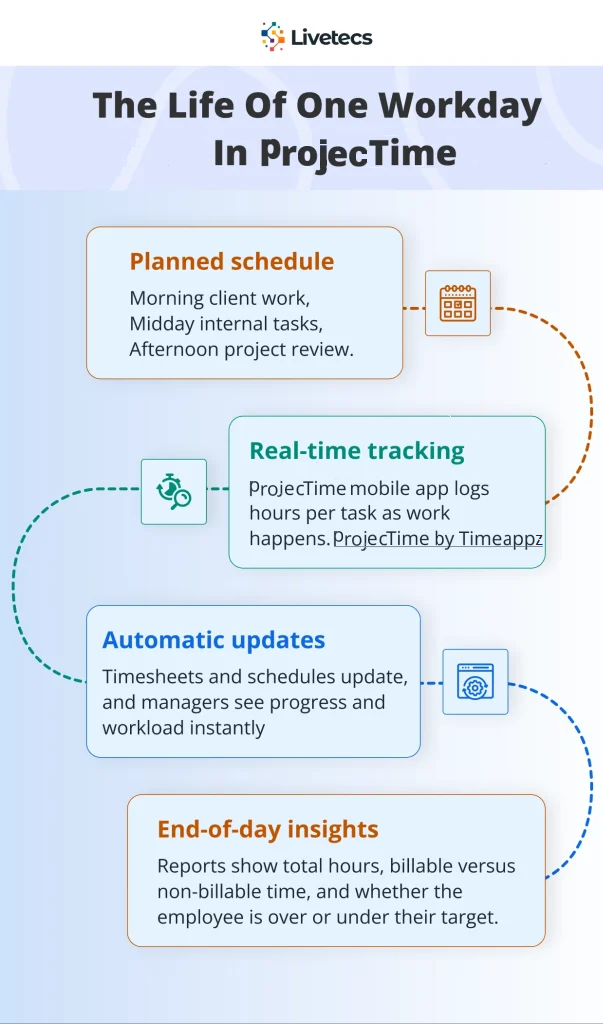
Track time against the schedule
- Ask employees to log hours daily against specific tasks or projects.
- Compare planned versus actual hours to know where the estimates need to be acted upon.
Review and adjust
- Use reports to analyze utilization, overtime, and project progress weekly.
- Adjust future schedules, work redistribution, or refine processes based on the data.
When you repeat this cycle and remain consistent, your work schedule tracker becomes an improvement engine, not just a calendar.
Neal Taparia discusses in an article by Forbes that transparent time logs and schedules reduce guesswork, helping remote teams understand how time is allocated and improve overall performance.
Facts and Figures: Why Tracking Time and Schedules Matters
Types of Teams and How They Use a Work Schedule Tracker
| Team type | Main challenge | How a work schedule tracker helps | ProjecTime by Timeappz example use |
| Consulting firm | Capturing all billable hours across clients | Link hours to projects, automate invoicing, monitor budgets | Use time tracking app for consultants features to log client work and generate invoices |
| In-house project team | Coordinating work across multiple projects | Central schedule, task assignments, and progress tracking | Use resource planning to assign tasks and track status by project |
| Field or job-site team | Tracking attendance and site hours | Mobile time logging, location-aware tracking, and clear reports | Use the mobile app to record time on site and feed it into payroll |
| Remote knowledge workers | Maintaining visibility into workloads | Transparent time logs and schedules reduce guesswork | Use digital timesheets plus employee productivity monitoring software insights to see where time goes |
| HR and operations | Managing PTO, holidays, and overtime | Central calendar with leave and shift data, plus alerts | Use leave and PTO tracking to prevent conflicts and cover critical roles |
Conclusion
In a world where every hour counts, a work schedule tracker is no longer an option. It is a core system for planning, tracking, and improving how the team uses time.
Software, such as ProjecTime by Timeappz combines scheduling, time tracking, and productivity insights into a unified platform so that your work remains organized, prevents overload, and keeps projects profitable.
Stop guessing and start your optimization process today.
Partner with Timeappz for a stronger, efficient workflow built with clarity and truth.
Let our consultants conduct a free workflow audit and recommend a tailored implementation plan contact ProjecTime by Timeappz today at [email protected] or Live ChatThe Live Chat option is in the bottom-left corner!← Look Left to explore implementation options tailored to your construction operations.
Learn how legal time tracking software supports accurate billing, compliance, and case-level time management.
Frequently Asked Questions
What is the difference between a work schedule tracker and a simple calendar?
- A calendar shows events, while a work schedule tracker connects events with time, people, and projects in a structured way. It includes features, such as digital timesheets, approvals, utilization reporting, and project-level scheduling that a basic calendar cannot provide.
How does ProjecTime by Timeappz help consultants specifically?
- ProjecTime by Timeappz provides a specialized time tracking app for consultants that records billable and non-billable hours by clients, projects, and tasks. It then turns those entries into reports and invoices, making it easier to manage budgets, track profitability, and avoid underbilling.
Is a work schedule tracker only useful for large teams?
- No, even small teams benefit from a work schedule tracker, because it builds habits of clear planning and accurate time logging from the start. As the team grows, the same system scales to support more people, projects, and complexity without changing tools.
How does employee productivity monitoring software stay fair and respectful?
- Modern employee productivity monitoring software focuses on total time and project data rather than constant surveillance. ProjecTime by Timeappz uses reports and analytics to highlight patterns, obstructions, and workload issues so managers can improve processes and support employees.
Can a work schedule tracker integrate with payroll and accounting systems?
- Many scheduling and time tracking tools integrate with payroll, accounting, and project management platforms to reduce manual data entry. ProjecTime by Timeappz supports connections and workflows that streamline payroll, automate overtime calculations, and improve financial accuracy.
How long does it take to see benefits from a work schedule tracker?
- Most teams start noticing improvements within a few weeks, as schedules stabilize, and time logs become consistent. Over a few months, the historical data builds into clear insights that support better staffing, pricing, and process decisions.
🎯 Move From Manual Calendar Friction to Total Scheduling Sovereignty
Allowing your distributed workforce, consulting teams, or field operations to run on static spreadsheets, paper shifts, or retroactive memory-based logs is a severe corporate liability. It directly breeds workforce burnout, budget overruns, and unrecorded utilization leakage. ProjecTime by TimeAppz replaces manual coordination with a unified, high-velocity workforce scheduling and capacity planning platform. Take absolute control of your organizational throughput, deploy safely on our optimized cloud, or run completely On-Premises behind private company firewalls.
Permanently Free Plan
Perfect for independent consultative practices and early-stage boutique agencies. Holds core timesheets, baseline billing features, and support for up to 2 users and 1 project permanently.
Advanced Resource Optimization Plan
Unlock full features via our 30-Day Free Trial—no credit card required. Experience automated multi-rate workflows, live check-in dashboards, predictive capacity analytics, and native payroll integrations.

Related Blogs
 DCAA Timekeeping Requirements: A Practical Guide for Government Contractors
If your organization holds a cost-reimbursable, time-and-materials, or labor-hour government contract
TimeAppz
 Timesheet Reminders: How to Ensure On-Time Submission Every Week
Late timesheet submissions are a management problem before they are an employee
TimeAppz
 Timesheet Approval Process: Best Practices for Teams
A timesheet without an approval is not a reviewed document. It is
TimeAppz