

How to Track Remote Employees’ Time: Best Practices using Software
Why Remote Time Tracking Matters
Remote work is no longer an exclusive benefit. Many employees worldwide now work from home for part of the week, and this trend is expected to continue expanding over time. Remote employees make structured time and productivity tracking essential for accurate payroll and honest workload distribution.
During the same time, some remote workers struggle with managing time and staying organized, which impacts output and deadlines. Many organizations have responded by adopting employee productivity monitoring and time-tracking tools to understand when, where, and how people do the work. The challenge is to gain insight without breaking trust or building a culture of surveillance.
Challenges of Tracking Remote Employees’ Time
In a shared office, time tracking is straightforward.
But across time zones, devices used, and flexible schedules, tracking becomes complex. Remote workers may divide their day between important work, meetings, or personal tasks, which makes manual timesheets and reconstructions prone to error and frustration.
Some companies today depend on manual spreadsheets that provide little to no verified data. Others utilize invasive monitoring, such as screenshots and keystroke logging. This type of surveillance can increase stress and damage engagement, especially when employees feel they are not trusted to manage their own time.
Principles: How to Track Remote Employees’ Time the Right Way
To make remote time tracking effective, there are core principles to follow that go beyond installing software. When these principles are put into practice, tools like ProjecTime by Timeappz become enablers of performance.
Transparency before tracking
Explain what is tracked, why it is important, and how the tracked data will be used.
Focus on results
Use time data to support workload plans, training, and project health.
Organization remains consistent
Apply basic rules for time entry and approvals to remote staff to avoid unfairness.
Respect and Privacy
Avoid collecting employee data from webcams or screenshots. Combine time tracking with employee productivity monitoring indicators employee productivity monitoring indicators app and task use.
Policy First: Setting Ground Rules for Remote Time Tracking
Before an organization chooses a tool, they need a clear, written time-tracking policy that remote employees can easily access. A strong policy consists of:
- Data tracked (such as work hours, meetings, and projects).
- Expected entries.
- Approval of entries.
- Problems when rules are ignored.
Best practices emphasize daily time entry rather than weekly batching, as well as a supervisor who approves documents with audit trails. This reduces disputes; payroll is used accurately and ensures proper compliance.
Adding a privacy section that explains retention periods and access rights can help ease concerns about the misuse of employee data.
How to Track Time Working from Home: Practical Techniques
Understanding how to track time working from home starts with providing employees with simple ways to log about their day. Some approaches include:
- Timers that track time against tasks.
- Desktop or web apps for timesheets.
- Mobile apps for remote work.
Best practice is to record real-time or same-day time entries instead of waiting till Friday. Those remote workers who save around 60-72 per day by not commuting often utilize that time for additional work, which makes it essential to capture hours accurately. With a tool like, ProjecTime by Timeappz employees can track time directly to projects and tasks from anywhere, ensuring that distributed teams follow the same process.

What to Look for in Remote Time Tracking Software
Mastering how to track employees’ time means selecting the right system that is central for all workers. Not all tools are designed for remote or hybrid teams but focusing on key capabilities removes long-term issues.
Some features include:
- A multi-device that captures time across the web, desktop, and mobile so that employees can log hours wherever they work from.
- Automated timers and conversions are turned into structured timesheets to reduce manual work.
- Tracking based on project, client, or task, so leaders can observe where and why time is spent.
- Integrated approvals, absence, holiday tracking, and overtime rules for workforce management that work consistently.
- Reports and dashboards provide data that help understand productivity trends, utilization, and costs without the need for spreadsheets.
ProjecTime by Timeappz is built around these principles, providing remote teams a standardized way to record time while giving managers visibility into utilization and project health.
Balancing Productivity Monitoring and Trust
As remote work continues to evolve, more companies have adapted to employee productivity monitoring tools that track usage of applications, websites, active, and idle time. These systems can reveal obstructions, detect threats, and key performers, but they must be handled carefully to avoid the culture of constant observation.
Leaders use productivity data for the following reasons:
- To understand when employees have their deep focus time, then recreate workflows and meeting schedules accordingly.
- Understand trends and outcomes to train employees, initiate strategic conversations, and allocate resources appropriately.
When time tracking from ProjecTime by Timeappz is combined with minimal monitoring (such as app usage during peak hours), it gives enough insight to improve performance while preserving autonomy.
Facts Table: Remote Work and Time Tracking
| Insight / Metric | Data Point & Source |
| Growth of remote work | By 2025, an estimated 32–36 million Americans will work remotely. |
| Commute time saved | Remote workers in the U.S. save about 55 minutes per day; global average is 72 minutes. |
| Employee monitoring prevalence | 37% of fully remote employees report that their employer monitors their online activity. |
| Time management challenges for remote workers | Around 25% of remote employees struggle with staying organized and managing daily tasks. |
| Adoption of task and work management tools | Approximately 63% of remote workers use tools like Trello or Asana to manage tasks. |
Comparison Table: Manual vs Software-Based Remote Time Tracking
| Dimension | Manual Spreadsheets / Ad-hoc Methods | ProjecTime by Timeappz–Style Software |
| Data accuracy | High risk of errors missed entries, and backfilled hours. | Real-time or daily entries with validation reduce errors significantly. |
| Visibility into work | Limited to total hours; difficult to see task or project breakdown. | Time logged by task, project, and client for rich context. |
| Compliance & audit readiness | Hard to reconstruct approvals and changes; weak audit trails. | Built-in approvals and audit trails with timestamps and change logs. |
| Scalability for remote teams | Becomes unmanageable as team size and locations grow. | Centralized, cloud-based access for distributed teams at any size. |
| Productivity insights | Almost no analytics beyond basic totals. | Dashboards for utilization, focus time, and cost metrics. |
| Employee experience | Tedious manual updates; easy to forget or delay entries. | Simple timers and apps lower friction and support daily habits. |
This comparison illustrates why many organizations move from fragmented systems to unified solutions like ProjecTime by Timeappz as their remote footprint expands. The shift not only improves reporting but also strengthens trust through transparent, consistent processes.
Step-by-Step: Implementing Time Tracking for Remote Teams
A new time-tracking process for remote employees works best when handled in stages. Instead of introducing tools overnight, companies follow a gradual implementation that includes focus groups and continuous feedback.
1. Describe objectives and KPIs
- Write about why you are tracking time, such as better billing, capacity planning, or compliance, and which metrics are important.
- Retain a document for entries, approvals, and privacy, then discuss them through team sessions with the data.
- Choose a system like ProjecTime by Timeappz, which utilizes multi-device tracking, approvals, and reporting for remote teams.
- Start with a single department to refine workflows, questions, and build internal advocates.
- Provide training to managers and employees, integrate with project tools, and standardize its use across all locations.
- Utilize data from dashboards to improve staffing, schedules, and coaching. Update policies as needed.
Through this process, emphasize that time tracking is about clarity and fairness, not micromanaging every minute of the day.
- Forbes – Remote work statistics and trends:
- S. Career Institute – Remote work statistics (commute time saved and remote workforce projections)
- – Additional remote work statistics (time management and software usage) – Additional remote work statistics (time management and software usage)
External Facts & Figures Reference Links
These sources support the claims of remote work growth, time savings, and productivity challenges.
Using ProjecTime by Timeappz for Remote Time Tracking
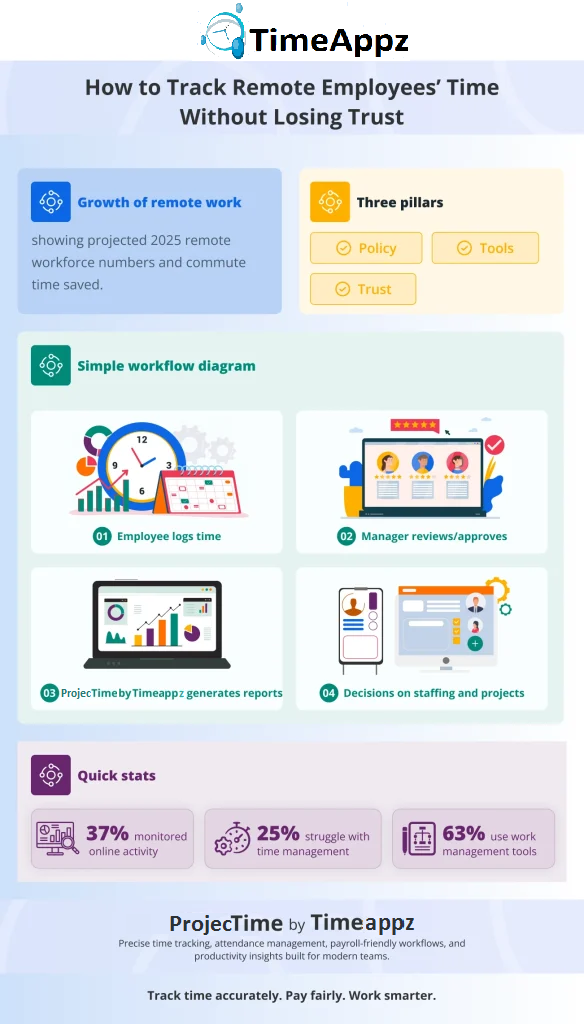
ProjecTime by Timeappz provides a centralized platform for tracking time, projects, and costs across office-based and remote employees. Teams can log hours on web, desktop, or mobile apps, and link each entry to the desired project, client, or tasks for accurate reporting.
Managers have access to dashboards that show:
- Trends of utilization.
- Patterns are overtime.
- Progress across projects.
This allows them to step in early when the workload increases.
When workflow approvals, leave tracking, and integrations with other business systems come together, it helps reduce administrative overhead while keeping data consistent. Combined with employee productivity monitoring, ProjecTime by Timeappz supports a culture of transparency and continuous improvement rather than control.
For organizations ready to turn these best practices into action, ProjecTime by Timeappz offers a flexible, remote-ready platform that unifies time tracking, approvals, and productivity insights in one place. To explore how it can support your distributed workforce, conduct a free workflow audit and recommend a tailored implementation plan contact ProjecTime by Timeappz today at [email protected] or Live ChatThe Live Chat option is in the bottom-left corner!← Look Left to explore implementation options tailored to your construction operations.
Frequently Asked Questions
How do you track remote employees’ time without micromanaging?
- By using clear policies, encouraging daily time entries, and adopting tools like ProjecTime by Timeappz that track time by task and project, rather than monitoring or keystroke methods.
What is the best way to track time working from home?
- The most effective method is a dedicated time-tracking app with timers and mobile access so that employees log work in real-time. Combining this with a simple routine helps build consistent habits.
Is employee productivity monitoring legal for remote workers?
- In many regions, monitoring is legal if it adheres to compliance and privacy laws. But employers should be transparent in their approach. When policies are written and clearly communicated, it maintains trust.
What metrics should I monitor for remote team productivity?
<
- Useful metrics include working hours, task completion rates, focus versus meeting time, and utilization by project or client. Tools like ProjecTime by Timeappz can provide these insights through dashboards and reports.
How can time tracking help prevent burnout in remote teams?
- By revealing patterns of consistent overtime, after-hours work, and overloaded individuals, time tracking gives managers a chance to refine workloads. Addressing these issues early supports healthier schedules.
What if employees resist new time tracking tools?
- Resistance is often rooted in fear of surveillance or extra admin work, so emphasize the benefits: accurate pay, fair workload distribution, and better recognition. Involve employees in pilot tests, gather feedback, and choose user-friendly tools to reduce friction.
Can small businesses benefit from remote time tracking software?
- Yes, even small teams gain from accurate billing, fewer payroll errors, and clearer visibility into who is working on what. Cloud-based platforms, such as ProjecTime by Timeappz, scale from a handful of users to large, distributed workforces without major infrastructure investments.
🎯 Put Your Timesheet Management on Complete Autopilot
Relying on manual human memory to construct administrative records leaves your organization exposed to severe revenue leakage, inaccurate client billing, and delayed payroll cycles. ProjecTime by TimeAppz eliminates the friction by bridging the gap between your team’s actual work stack and your financial ledger. Streamline your operations, satisfy audit oversight parameters, and run securely on our optimized cloud or deploy On-Premises behind private corporate networks.
Permanently Free Plan
Perfect for small teams or independent operators. Includes core timesheets, billing, and support for up to 2 users and 1 project permanently.
Advanced Automation Trial
Unlock our 30-Day Full-Feature Trial—no credit card required. Experience multi-layer calendar syncing, automated webhooks, custom approval gateways, and native Zapier integration.

Related Blogs
 DCAA Timekeeping Requirements: A Practical Guide for Government Contractors
If your organization holds a cost-reimbursable, time-and-materials, or labor-hour government contract
TimeAppz
 Timesheet Reminders: How to Ensure On-Time Submission Every Week
Late timesheet submissions are a management problem before they are an employee
TimeAppz
 Timesheet Approval Process: Best Practices for Teams
A timesheet without an approval is not a reviewed document. It is
TimeAppz