

Revenue Protection in Professional Services: Mitigating Utilization Leakage and Scheduling Disruption

Avoid Scheduling Conflicts & Lost Revenue
Manage appointments, time tracking, and billing in one powerful platform.
How to Reschedule an Appointment Professionally
Appointments face unintended inconsequences. They don’t go as planned.
Emergencies happen.
Client asks for changes.
Deadlines are delayed.
Team members become unavailable.
The real question is not about the occurrence of changes. It’s about understanding how to reschedule an appointment without confusion, lost revenue, or strained relationships.
- When rescheduling is done poorly, it looks unprofessional.
- When done correctly, it builds a long-lasting trust.
As highlighted in The New York Times productivity challenge, effective calendar management, including planning ahead and controlling meeting flow, is key to reducing stress and maintaining professional workflows.
Let’s explore how to manage appointment changes smoothly and strategically.
Why Rescheduling Matters More Than You Think
Rescheduling is not limited to picking up a new date. It affects many areas:
- Perception of clients.
- Workload on teams.
- Project agenda.
- Tracking of revenue.
- Utilization of resources.
When rescheduling is not managed properly, it can create consequences across teams and billing cycles. This is why having a proper system in place is essential.
The Psychology of Professional Rescheduling
Clients usually understand that schedule changes may happen. What frustrates them is uncertainty. When appointments are canceled or rescheduled without proper communication, it creates confusion, delays, and distrust.
Managing changes professionally isn’t about moving appointments; it’s about creating a sense of reliability. When clients see that your processes are prepared for disruptions, track impacts on deadlines, and protect their time, they feel confident in your ability to deliver.
Professionalism is less about perfection and more about accountability. It shows that you can handle changes gracefully, maintain clarity, and uphold commitments. Tools like ProjecTime by Timeappz help support this by giving visibility into schedules, workloads, and resource allocation, so clients sense stability even when changes occur.
Additionally, Harvard Business Review emphasizes that transparent communication and proactive planning are key to preserving trust and productivity when schedules change. Early notifications and structured alternatives reduce friction and client dissatisfaction.
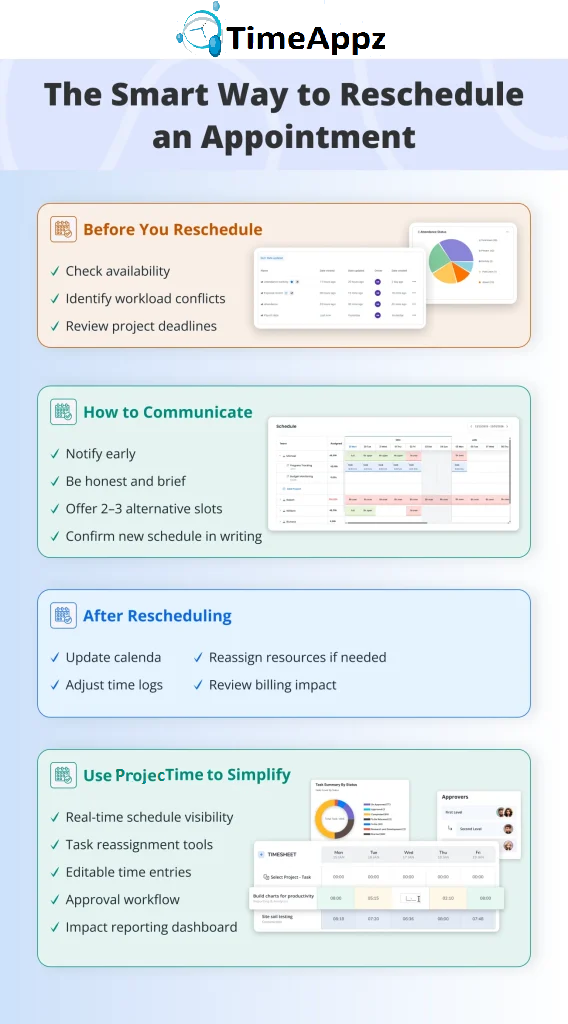
- Check their availability.
- Make sure there are no overlapping deadlines.
- Evaluate team workloads.
- Understand and review project priorities.
- Give them 2-3 specific time options to choose from.
- Be clear in the time zone.
- Confirm the format (virtual or in-person)
- Send an updated calendar invite.
- Confirm the agenda if required.
- Make adjustments to internal tracking systems.
Step-by-Step: How to Reschedule an Appointment
Follow the steps below to ensure appropriate rescheduling.
1. Review Your Calendar First
Before reaching out to the client:
If you blindly offer new times without checking internal capacity, it leads to further modifications and damages credibility.
2. Inform the Client Early
Timing matters. The earlier a client is notified, the more professional you appear.
A short message works best. For example:
“Due to (short reasoning), I need to reschedule our appointment originally planned for (date/time). I apologize for any inconvenience. Would any of the following times work for you?”
Be honest, brief, and avoid over-explaining.
For a practical breakdown of professional wording and communication tips, refer to the Indeed guide:
The Indeed guide on how to reschedule a meeting explains that professionalism and early communication are key. It recommends notifying the recipient as soon as possible, apologizing briefly, giving a clear reason (without oversharing), and offering specific alternative dates and times. The article also emphasizes confirming the new meeting in writing and updating calendar invites immediately to avoid confusion.
3. Offer Alternatives Immediately
Avoid asking a client, “Let me know when you are free.” It places a burden on them and can delay confirmation.
Instead, do the following:
4. Confirm in Writing
Once the client agrees:

How ProjecTime Simplifies Appointment Rescheduling
When appointments change, disruption is minimized.
ProjecTime by Timeappz reduces bottlenecks by providing the following:
- Visibility into schedules: Team availability and workload can be observed instantly, without guessing or double-booking.
- Planning of resources: Tasks can be reassigned without overloading other team members. Balance should be maintained across projects.
- Updates on time tracking: Logged hours can be edited in real-time to reflect appointment changes.
- Control on approval: Revise schedule changes through proper workflows before finalizing them.
- Impact reporting: You can view how rescheduling affects timelines, utilization rates, and project delivery.
This is valuable for industries that use healthcare time tracking software or agency time tracking systems, where each hour impacts billing and compliance.
- Dashboard for resources: You can instantly identify team members who are overloaded.
- Timelines for tasks: Spot overlaps and deadline conflicts visually.
- View of workloads: Assess project capacity before offering new appointment times.
Detect Conflicts Early with ProjecTime
Most scheduling problems are not caused by change; they are caused by late detection.
ProjecTime allows you to detect issues before you confirm new times:
Instead of reacting to problems, you prevent them from occurring.
- Edit time entries: You can reallocate hours accurately across projects.
- Project plans can be updated: Always align schedules with modified timelines.
- Billing accuracy can be maintained: Ensure billable and non-billable records are accurate.
Adjust Billing When Appointments Shift
Rescheduling can affect billable hours, mainly in consulting, healthcare, and agency environments.
With ProjecTime, you can do the following:
This is important for businesses that rely on structured agency time tracking or regulated healthcare time tracking software environments.
Missed adjustments are equal to lost revenue.
The Role of AI in Modern Scheduling
Understanding how to reschedule an appointment is essential for maintaining client trust, protecting your schedule, and ensuring the business continues even if plans change unexpectedly.
Scheduling isn’t about filling empty calendars anymore. It’s smarter, faster, and predictive. As workplaces become complex and teams operate across different time zones and locations, traditional scheduling methods are being replaced by smarter systems that reduce friction and save time.
AI-powered scheduling tools are transforming how businesses manage appointments and workloads:
Suggest Optimal Meeting Times
Instead of relying on manual calendars, AI analyzes availability, task distribution, time zones, and historical preferences to recommend efficient meeting slots.
Predict Availability
AI systems can anticipate when team members are prone to being overloaded based on project deadlines and tasks. This helps managers avoid overbooking.
Reduce No-Shows
Smart reminders, automated confirmations, and cognitive insights help lower missed appointments. This is essential in healthcare, consulting, and agency workplaces where time directly impacts revenue.
Automate Reminders
AI can send personalized reminders via email or a text message, follow up automatically, and adjust reminders based on meeting type or urgency.
However, as highlighted by sForbe, AI can unintentionally expand the “infinite workday” if organizations don’t redesign workflows and protect focused time. Technology must be paired with intentional scheduling practices to prevent burnout.
Tools like ProjecTime ensure that when appointments shift or automation suggest changes, project timelines, billing records, and resource allocation remain accurate and aligned.
For a deeper look at AI’s impact, here’s a useful overview:
The TIMIFY blog on AI-powered scheduling explains how artificial intelligence is transforming appointment management by automating booking processes, analyzing availability in real time, and optimizing resource allocation. AI tools reduce administrative workload, minimize no-shows through smart reminders, and improve customer experience by offering instant, accurate scheduling options. The article emphasizes that businesses using AI-driven systems can increase efficiency, reduce errors, and make more data-informed scheduling decisions.
ProjecTime complements this evolution by ensuring that once appointments are changed, time tracking and billing systems remain accurate.
Comparison Table: Manual Rescheduling vs ProjecTime System
| Feature | Manual Process | With ProjecTime by Timeappz |
| Calendar Check | Manual review | Real-time visibility |
| Workload Review | Spreadsheet-based | Resource dashboard |
| Conflict Detection | After confirmation | Before confirmation |
| Time Log Updates | Manual edits | Instant updates |
| Billing Adjustments | Error-prone | Automated accuracy |
| Reporting Impact | Limited | Utilization & deadline reports |
Industry-Specific Considerations
Below is a breakdown to understand how scheduling an appointment looks like for different industries.
Healthcare
In healthcare, missed or postponed appointments have an impact on:
- The flow of patients.
- Revenue cycles.
- Documentation on compliance.
- When a structured healthcare time tracking software is utilized, it ensures accurate audit trails and billing compliance when schedules shift.
Using structured healthcare time tracking software ensures accurate audit trails and billing compliance when schedules shift.
Agencies
In agencies, client appointments are directly related to:
- Billable consultations.
- Reviews of campaigns.
- Creative approvals.
Without strong agency time tracking tools, rescheduling can lead to billing discrepancies and delayed invoicing.
With a proper agency time tracking software, time entries adjust in real-time, ensuring billable hours remain aligned with updated schedules and project timelines.
ProjecTime by Timeappz effectively addresses both industries.
Best Practices to Avoid Frequent Rescheduling
Below are some best practices to keep your appointments stable, professional, and disruption-free:
- Keep a buffer of time between meetings.
- Avoid overbooking.
- Always confirm appointments 24 hours in advance.
- Utilize shared calendars.
- Weekly monitor overload capacity.
Occasional rescheduling is normal. Repeated rescheduling shows poor planning.
Conclusion
Learning how to reschedule an appointment professionally is essential in today’s rapidly growing environment. The key lies in forward-thinking communication, being aware of workloads, and accurate time tracking.
ProjecTime by Timeappz ensures that change in appointment doesn’t hinder operations. From schedule visibility and resource planning to billing accuracy and impact reporting, it provides a structured system that supports healthcare providers, agencies, and professional service teams.
If you’re ready to reduce scheduling friction and maintain operational clarity, contact ProjecTime by Timeappz today at [email protected] or Live ChatThe Live Chat option is in the bottom-left corner!← Look Left to explore implementation options tailored to your construction operations.
Frequently Asked Questions
What is the best way to reschedule an appointment professionally?
- The best approach is to notify the client beforehand, apologize briefly, and offer 2–3 specific alternative time slots. Always confirm the new time in writing and update your calendar immediately.
How do you reschedule without damaging client trust?
- Be transparent, respectful, and organized. Avoid last-minute cancellations unless necessary. Offering alternatives and confirming quickly shows responsibility and professionalism.
How does rescheduling affect billing
- If the appointment is billable, time logs may need adjustments. Without proper tracking, businesses risk underbilling or overbilling. Systems like ProjecTime allow accurate reallocation of hours.
Can scheduling software prevent conflicts?
- Yes. Tools with workload dashboards and resource planning features help detect overload before confirming new appointments. This prevents repeated changes.
Is rescheduling common in healthcare and agencies?
- Yes. Healthcare providers and agencies frequently adjust appointments according to client needs. Structured healthcare time tracking software and agency time tracking systems help manage these changes without financial errors.
- Keep it brief and professional. Share only necessary details. Oversharing can reduce clarity and professionalism. Focus on offering solutions rather than explanations.
🎯 Future-Proof Your Firm’s Scheduling and Revenue Architecture
Managing fluid project schedules through fragmented, manual spreadsheets or disconnected calendars is an expensive operational mistake that creates compliance friction, scheduling conflicts, and hidden margin erosion. ProjecTime by TimeAppz unifies real-time calendar tracking, workforce scheduling, and direct ledger invoicing into a single console. Take absolute control of your billable realization rates, deploy safely on our secure cloud, or host On-Premises behind private firewalls.
Permanently Free Plan
Tailor-made for independent consulting teams and small agencies. Holds core timesheets, baseline billing tools, and support for up to 2 users and 1 project permanently.
Advanced Automation Plan
Unlock full features via our 30-Day Free Trial—no credit card required. Experience multi-calendar synchronization, dynamic bottleneck dashboards, real-time billable edits, and automated approval workflows.

Related Blogs
 DCAA Timekeeping Requirements: A Practical Guide for Government Contractors
If your organization holds a cost-reimbursable, time-and-materials, or labor-hour government contract
TimeAppz
 Timesheet Reminders: How to Ensure On-Time Submission Every Week
Late timesheet submissions are a management problem before they are an employee
TimeAppz
 Timesheet Approval Process: Best Practices for Teams
A timesheet without an approval is not a reviewed document. It is
TimeAppz