

Capital Optimization via Digital Labor Diagnostics: Eliminating the Margin Erosion of Manual Tracker Templates
Why a work hours tracker template matter
Most people underestimate the time they lose while multitasking due to interruptions and low-value tasks.
A structured work hours tracker template records where your time is actually spent so you can protect focus time and reduce waste. For teams, tracking work hours improves:
- Transparency
- Simplifies payroll
- Supports fairness with workload distribution
ProjecTime by Timeappz adopts the concept of a basic work hours tracker template and transforms it into a time tracking platform into digital timesheets, approvals, and reporting.
Instead of managing multiple data sets, employees log time directly into the app from web or mobile, and managers get instant visibility of project hours and attendance.
What a good work hours tracker template should include
A work hours tracker template needs to be detailed and accurate for reporting, but simple enough to be used by individuals or teams. Your template should capture the following:
- Date and day of the week.
- Name of employee or ID.
- Client or project.
- Description of the task or activity.
- Start time, end time, and total hours.
- Billable and non-billable indicators.
- Notes or comments (for overtime, additional tasks, or exceptions).
ProjecTime by Timeappz has these fields as a built-in feature in the timesheet layout. You can customize them by project or department. The system calculates total hours, overtime, and billable amounts automatically that removes the chances of manual errors and saves time during payroll.
Turning a static template into a live time management system
A great starting point for individuals and small teams is a downloadable work hours tracker template in Microsoft Excel, Google Sheets, or a PDF. However, as your workload increases, you may face issues with version control, missed entries, or slow manual reporting. At this point, adopting a platform like ProjecTime by Timeappz is a major transformation: For employees: It allows them to track work hours in real-time from a desktop or mobile using digital timesheets. For managers: They can set approval workflows, set bill rates, and generate reports that show hours by project, client, team member, or cost center. The live system shows recent figures on the work hours tracker template and transforms time entries into useful insights for budgeting, scheduling, and forecasting.
Time management tools for teachers and educators
Teachers and educators juggle multiple tasks at a time. They have to organize their teaching hours, plan lessons daily, set up grading, meetings, and after-school programs. These are plans that go beyond standard school schedules. In education, a work hours tracker template helps teachers understand how much time they spend in class versus preparation, admin, and student support. ProjecTime by Timeappz supports time tracking for education across locations with features for
- Tracking class hours.
- Office hours.
- Project-based activities.
When schools utilize time management tools for teachers, they gain visibility into workload distribution and make improved decisions about staffing and support. Moreover, this data is useful for budgeting, funding reporting, and ensuring compliance with mandatory hours.
From Static Template to Smart Tracking with ProjecTime
| Feature / Need | Basic Work Hours Tracker Template | Time Tracking App (ProjecTime by Timeappz) |
| Record daily work hours | Manual entry in a spreadsheet or paper. | Digital timesheets with real-time entry. |
| Accuracy and error reduction | Prone to manual errors and missing entries. | Automatic hour totals and overtime calculations. |
| Approvals and compliance | Manager signs off manually, no clear audit trail. | Built-in approval workflows and audit history. |
| Remote and mobile work | Limited or awkward on mobile devices. | Native mobile app for logging hours anywhere. |
| Reporting and analytics | Manual reports, slow to build and update. | One-click reports by project, client, or team. |
| Time management insights | Harder to spot patterns in raw data. | Dashboards highlight unproductive time and bottlenecks. |
Why ProjecTime by Timeappz stands out
ProjecTime by Timeappz is designed to feel like an enhanced work hours tracker template that is automated, secured, and integrated with the workflow. Even though the timesheet rows and hours totals may seem familiar, the platform behind the scenes handles:
- Overtime rules.
- Attendance tracking.
- Multi-currency expense management.
Additionally, it supports real-time tracking for employees in the field or on-site with its mobile app, making it a strong candidate when you search for best employee time tracking app free. With its built-in reporting and analytics, ProjecTime by Timeappz helps businesses identify where time is lost and how to reallocate resources for improved efficiency and profitability.
Facts and Figures External Links
Below are some of the external sources that support the idea of a work hours tracker template:
- The New York Times U.S. labor productivity surged 2.3% in Q2 2024, with output up 3.3% against just 1% more hours worked. This efficiency led to highlights how productivity gains lead to better output with fewer hours worked. It reports U.S. labor productivity surged 2.3% in Q2 2024, with output up 3.3% against just 1% more hours worked. This efficiency production without proportional extra time, benefiting profits and potentially wages.
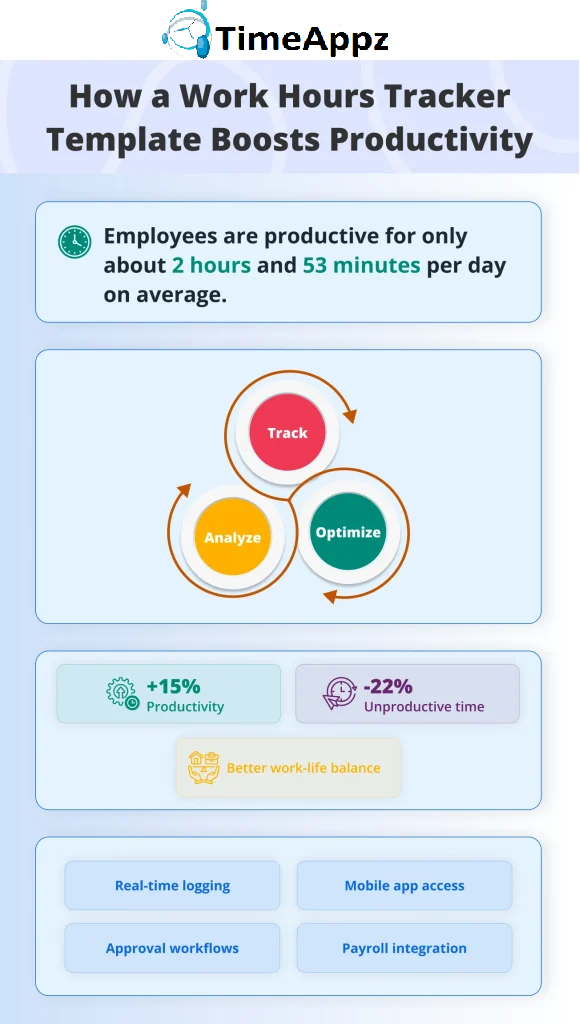
- According to Time Analytics, time tracking is linked to 8-15% of higher productivity through improved time visibility and reduced waste. Teams often reallocate 10-20% of hours from low-value tasks to high-impact work.
- The article by LifeHack Method highlights that employees are productive for 2 hours and 53 minutes per day with an 8-hour shift. This is due to distractions and interruptions taking 23 minutes to recover from. Trackers expose these gaps to reclaim focus time.
Conclusion
If you are ready to adopt software beyond manual spreadsheets, start with a neat work hours tracker template and later upgrade to a smart, automated system like ProjecTime by Timeappz to experience the benefits of accuracy and real-time tracking. For more information, reach out to us at [email protected] or Live ChatThe Live Chat option is in the bottom-left corner!← Look Left to explore implementation options tailored to your construction operations.
Frequently Asked Questions
What is a work hours tracker template?
- A work hours tracker template is a structured timesheet (usually a table) that lets you record when you start and finish tasks, how many hours you worked, and which project or client those hours belong to. It can be set up in a spreadsheet, document, or digital form and works as the foundation for more advanced time tracking systems.
How does a work hours tracker template improve time management?
- By logging your work consistently, you gain a real-time picture of how long tasks take, which helps you plan your day and avoid overcommitting. Over time, patterns appear, such as frequent interruptions or underestimated jobs, which can help you adjust schedules, block focus time, and delegate more effectively.
Who should use a work hours tracker template?
- Anyone who wants to manage time better can benefit, whether they are freelancers, office staff, project managers, teachers, or remote teams. It is useful in roles where you bill by the hour, track project budgets, or require proof of hours for compliance or payroll.
What is the difference between a free template and a tool like ProjecTime by Timeappz?
- A free work hours tracker template provides a basic structure, but still requires manual entry, calculations, and reporting. ProjecTime by Timeappz automates those steps with digital timesheets, mobile apps, approvals, and reporting that scale easily as your team and projects grow.
Can a work hours tracker template help reduce burnout?
- Yes, because it highlights when you are consistently working long days, skipping breaks, or taking on many tasks at once. With that data, you can rework deadlines, rebalance workloads, and protect personal time more deliberately.
Is there a mobile-friendly way to use a work hours tracker template?
- You can use basic templates on mobile spreadsheets, but they are often clumsy and easy to forget. A dedicated mobile time tracking app like ProjecTime by Timeappz lets you start and stop timers, submit timesheets, and track work hours from any device with far greater convenience.
🎯 Move From Static Template Friction to Full Operational Sovereignty
Relying on manual dropdown cells, loose paper templates, or retroactive memory to log your organization’s labor hours is an expensive operational liability. It directly causes billable leakage, delayed client billing cycles, and unrecorded utilization compliance risks. ProjecTime by TimeAppz replaces manual spreadsheet friction with a centralized, high-velocity resource planning framework. Take absolute control of your organizational metrics, deploy safely on our optimized cloud, or run completely On-Premises behind private company firewalls.
Permanently Free Plan
Tailor-made for independent professional teams and early-stage boutique startups. Holds core timesheets, baseline billing features, and support for up to 2 users and 1 project permanently.
Advanced Resource Optimization Plan
Unlock our 30-Day Full-Feature Trial—no credit card required. Experience automated multi-rate workflows, live check-in dashboards, cross-project data tracking, and native payroll ledgers integration.

Related Blogs
 DCAA Timekeeping Requirements: A Practical Guide for Government Contractors
If your organization holds a cost-reimbursable, time-and-materials, or labor-hour government contract
TimeAppz
 Timesheet Reminders: How to Ensure On-Time Submission Every Week
Late timesheet submissions are a management problem before they are an employee
TimeAppz
 Timesheet Approval Process: Best Practices for Teams
A timesheet without an approval is not a reviewed document. It is
TimeAppz