

Capital Optimization via Automated Daily Progress Diagnostics: Eliminating Administrative Chasing and Unbilled Labor Leaks

The Importance of Daily Work Reporting
Writing a daily work report may seem like routine, but it is one of the finest ways to improve productivity, communication, and accountability in the workplace. From managing projects, guiding teams, to reporting directly to leadership, a structured report ensures progress is noticed, and no issue is neglected.
Track time, monitor performance, and generate detailed reports all in one place.
Why Daily Work Reports Matter
An organized daily work progress report gives a clear picture of what was achieved during the day. This helps team members remain aligned and ensures that project deadlines stay on track.
- Accountability across teams is.
- Communication with management is becoming better.
- Project risks were identified earlier.
- Time and resources are tracked accurately.
- Performance reviews are simplified.
Key Advantages
A article notes that professionals using AI and structured workflows benefit from clear objectives, defined responsibilities, and improved productivity. When employees follow a daily work report to their boss, it removes confusion and ensures that updates are clearly understood.

Core Parts of a Daily Report
An effective daily work report should be neat and easy to scan. The following table outlines the essential components.
| Section | Purpose | Example |
| Date & Details | Identify employee | Name, Date |
| Tasks Done | Completed work | Client proposal finished |
| Tasks Ongoing | Work in progress | Website redesign |
| Issues | Problems faced | Vendor delay |
| Time | Hours spent | 3 hours testing |
| Next Plan | Upcoming tasks | Finalize documents |
Writing Concise Daily Reports for Managers
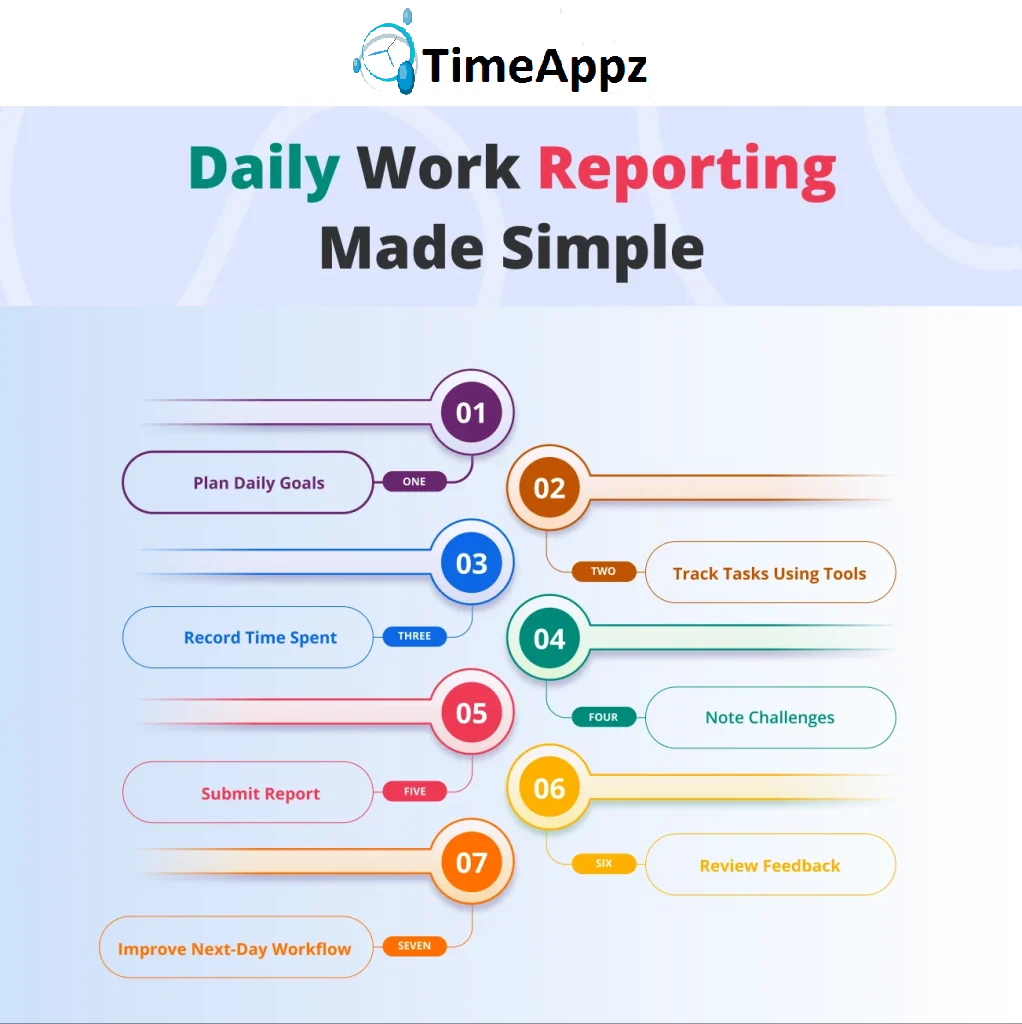
Learning how to write a concise daily work report for project managers is simple and easy to follow:
1. Define Clear Objectives
Start your report by highlighting the goals for the day. This sets the foundation for the rest of the update.
2. Summary of Completed Tasks
Your focus should be on important activities. Avoid listing details that do not impact project outcomes.
3. Highlight Issues Early
Mentioning problems immediately helps managers allocate resources quickly.
4. Accurate Time Tracking
Ensure your data is reliable by using time tracking software and consultant time tracking sheet tools.
5. Keep It Short
Aim for transparency. Short sentences and bullet points improve readability. By following these steps, managers maintain an efficient daily work progress report routine.
Choosing the Right Reporting Tools
Manual reporting consumes time. At this point, software solutions for automating daily task reporting have become essential. Modern tools simplify data entry and generate automated summaries. Organizations can:
- Find well-rated applications for tracking daily tasks and deadlines.
- Integrate reporting with HR attendance tracking software.
- Monitor employee productivity with payroll hours tracking software.
- Utilize specialized platforms, such as the best time tracking software for accounting firm.
These technologies reduce repetitive work and improve reporting accuracy,
Advantages of Project Platforms
Many professionals ask: What are the benefits of using an advanced project management platform? Some major advantages are:
- Real-time collaboration.
- Streamlined project data.
- Automated reminders.
- Detailed performance metrics.
- Seamless integration with financial tools.
According to research, companies that use digital productivity platforms experience quicker decision-making and improved team coordination.
Example of Daily Work Report Format
Below is a simple template you can adapt to for daily use.
| Field | Details |
| Employee Name | John Smith |
| Date | March 26, 2026 |
| Tasks Completed | • Completed customer onboarding setup
• Updated system documentation |
| Tasks In Progress | Testing new reporting feature |
| Issues Faced | Waiting for API credentials |
| Time Spent | • 2 hours on development
• 3 hours on testing |
| Next Day Plan | • Finalize testing and submit review |
- Writing excessively detailed reports.
- Ignoring time tracking.
- Using inconsistent formatting.
- Not reviewing before submission.
Common Mistakes to Avoid
The following reporting errors should be prevented:
By using reliable software solutions for automating daily task reporting, most of these errors can be reduced.
Tips to Improve Daily Reporting Efficiency
Follow these tips for faster and more effective reporting:
- Use standard templates.
- Automate repeated entries.
- Integrate time tracking software tools.
- Review reports before submission.
- Use simple language.
When structured templates and digital tools are combined, manual work is reduced, and productivity improves.
Conclusion
Writing a daily work report improves the overall workflow of an organization. By following a daily work report format using reliable tools and tracking time accurately, teams can maintain productivity and meet deadlines effectively.
Frequently Asked Questions
What is the purpose of a daily work report?
- A daily work report helps track completed tasks, monitor progress, and identify challenges, ensuring better communication between employees and managers.
How long should a daily work report be?
- A report should cover key tasks, time spent, issues faced, and next-day plans without unnecessary details.
Can daily reports be automated?
- Yes. Software solutions allow users to generate reports automatically using recorded data.
What tools help create better daily reports?
- Tools like HR attendance tracking software, time tracking software, and Payroll Hours Tracking software help streamline reporting and improve accuracy.
How often should daily reports be submitted?
- Most organizations require daily reports to maintain consistent tracking and accountability.
Is a daily work report useful for remote teams?
- Yes, remote teams benefit significantly because reports provide visibility into tasks, deadlines, and time spent on projects.
🎯 Move From Manual Status Aggravation to Total Operational Sovereignty
Allowing your distributed workforce to manage daily updates through manual templates, loose text threads, or fragmented emails is an expensive operational liability. It directly causes administrative fatigue, delayed milestones, and silent profit erosion. ProjecTime by TimeAppz replaces manual friction with a centralized, automated task tracking and progress reporting platform. Take absolute control of your organizational throughput, deploy safely on our optimized cloud, or run completely On-Premises behind private company firewalls.
Permanently Free Plan
Tailor-made for independent consulting teams and early-stage boutique agencies. Holds core timesheets, baseline billing features, and support for up to 2 users and 1 project permanently.
Advanced Resource Optimization Plan
Unlock our 30-Day Full-Feature Trial—no credit card required. Experience automated report building, live check-in dashboards, cross-project data tracking, and native payroll ledgers integration.

Related Blogs
 DCAA Timekeeping Requirements: A Practical Guide for Government Contractors
If your organization holds a cost-reimbursable, time-and-materials, or labor-hour government contract
TimeAppz
 Timesheet Reminders: How to Ensure On-Time Submission Every Week
Late timesheet submissions are a management problem before they are an employee
TimeAppz
 Timesheet Approval Process: Best Practices for Teams
A timesheet without an approval is not a reviewed document. It is
TimeAppz