

Employee Performance Monitoring Tools for Precise Time Tracking in Your Business
Introduction
The guide below provides an overview of modern employee performance monitoring tools, their benefits to organizations, and the legal and ethical procedures that ensure responsible use. Additionally, this article will discuss how to assess and select an effective solution for your team, provide practical tips, a comparison table, and authentic resources to help you implement performance monitoring in an effective way.
Why employee performance monitoring tools matter
When work expanded to remote and hybrid roles, managers lost visual control of work in their daily routine. This created two issues:
- Inaccurate payroll and billing.
- Weak project predictions.
When modern employee performance monitoring tools are applied, they collect real-time data and show managers the factors to plan better, but only when used ethically and paired with engagement practices.
According to an article by McKinsey & Company, data containing people’s performance corresponds to better business results. When companies focus on people performance, they are likely to achieve higher sales growth than their peers.
What these tools deliver
Below are the benefits to a business of adapting to these tools:
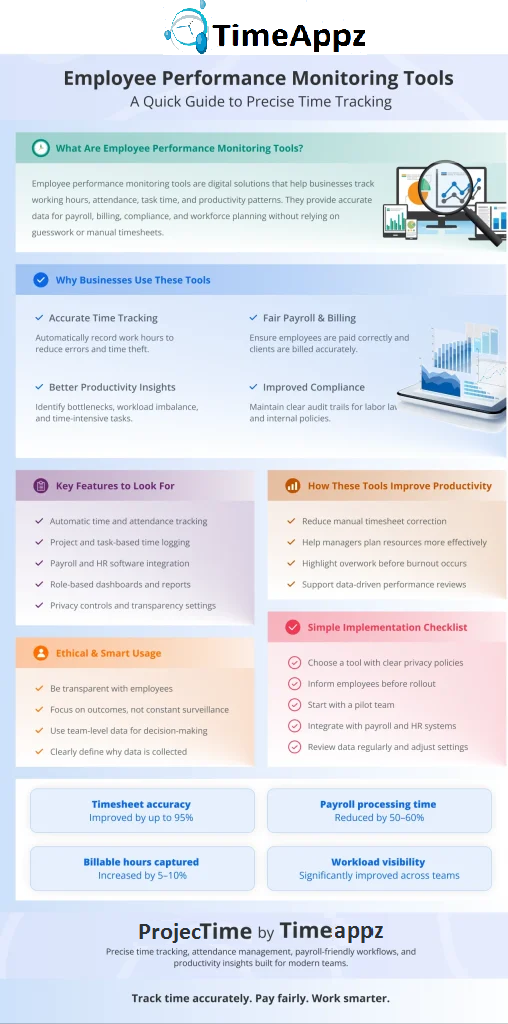
Accurate time and attendance
An article by Forbes states that when time tracking is automated, it reduces manual time sheet errors and reduces the risk of time theft.
Although time theft is a common management discussion point, raising awareness allows businesses to create fairer and more effective policies.
Reasonable client billing and project costing
When time tracking is detailed and time logs are accurate, it enables firms to invoice specifically for a task or subtask.
Actionable productivity analysis
As stated in the article by McKinsey & Company, when task time, project deadlines, and meeting load are combined, businesses can identify constraints and optimize performance.
Built-in audit trails
When logs are timestamped and secured, it helps organizations manage accurate payroll audits and maintain compliance with labor laws.
Improved workforce planning
According to an article by SHRM, once an organization analyzes its utilization and absence patterns, it can anticipate workforce capacity and prevent problems immediately.
The ethical line: What to watch for
Tools that tend to observe employees closely (such as keystrokes, screenshots, and webcam videos) can harm the trust and self-confidence of employees.
Research shows that individual surveillance can go wrong if not executed with care and transparency. The article by Harvard Business Review cautions that monitoring individuals isn’t a productivity factor. It is how the data is used that matters most.
- The focus for planning should be on team-level dashboards. Consider individual data when needed for legal acts or safety.
- The monitoring policy should be clear. It should write where and why the data is collected, and who has access to it.
- If any change or discussion is taking place, teams should be given a choice to contribute.
Practical rules
Core features to compare
Below is a list of what to expect when using these tools:
- Time tracking: Automatic idle detection, readjustments, geofencing, and mobile check-ins.
- Project accounting: Track billable and non-billable work, time per task, and reports for each client.
- Integrations: Connect with payroll, HR systems, invoicing software, and project management tools.
- Privacy: Control access by role, manage data storage rules, and clear permissions.
- Reports and alerts: Notify missed clock-ins, overtime, and absence patterns.
Visit ProjecTime by Timeappz for detailed time and attendance hr software

Quick facts & figures (evidence-based highlights)
- According to an article by McKinsey & Company, companies who have employee performance as a priority tend to outperform competitors and achieve higher revenue growth.
- SHRM mentions that employees working more hours are prone to burnout and inefficiency. When hours are tracked, it helps point out overwork and improve results.
- As mentioned in WIRED, since remote work has evolved, the use of productivity monitoring tools has increased, also warning that a lack of transparency breaks trust and confidence.
For more reading, check linked sources from Forbes, SHRM, McKinsey, HBR and Wired in the references section below.
Comparison table — popular feature checklist
| Feature / Focus | ProjecTime by Timeappz | Generic Monitoring Tools | Team-focused Time Trackers |
| Automatic time capture (desktop + mobile) |  |
|
|
| Project & client billing reports | |
|
|
| HR & payroll integrations | (HRIS/payroll friendly) |
Varies | Often limited |
| Privacy & role-based access | (configurable) |
Varies (some invasive defaults) | Usually team-level only |
| Idle detection & manual edits | |
|
|
| Screenshots / keystroke logging | Off by default / configurable | Often available (controversial) | Rare |
| Geofencing / field worker support | |
Some | Limited |
| Pricing model | Per user / per feature | Per user / per feature | Freemium to paid tiers |
How to choose the right tool
Here is a step-by-step guide to understand how to choose the right tool:
- Fix payroll errors.
- Increase project profitability.
- Avoid time theft.
- Improve capacity planning
Set a goal
Be specific and decide if you want to:
Explore integrations
The selected tools should connect with payroll, HR, invoicing, and project management systems. For instance, ProjecTime is built for payroll and HR workflows.
Choose privacy-friendly defaults
Select vendors that focus on team-level data and need admin approval if an individual has to be tracked in detail.
Pilot with a team
Test the tool with a team for three to six weeks, collect reviews, and track KPIs such as time sheet accuracy and billing differences.
Compare results
Measure performance and happiness for teams using the tool with a control group (number of hours worked, speed of invoice, and engagement scores) to understand a wider rollout.
Train and communicate
Provide basic training, a clear FAQ list, and make the monitoring policy a key addition to the employee handbook.
Implementation checklist
Below is a practical checklist that defines the purpose of monitoring tools and issues that they should solve:
- Create a monitoring policy and FAQ that explains which tasks are being tracked and why.
- Appoint a data owner, preferably someone from HR or Operations, to manage and supervise the data.
- Set privacy controls by limiting who can see what information based on their roles.
- Connect the core system with a tool that works with payroll and project management software.
- Test the tool with a small team before the final rollout, and review feedback for improvements.
- Focus on team insights by using dashboards to observe overall trends, and if individual data requires review, do so with compliance.
Sample use cases
Employee performance monitoring tools work differently within teams of an organization. Each uses time tracking data in practical ways to solve everyday business problems, improve efficiency, and recover lost productivity without added pressure on employees.
Professional services firms
They track consultant hours by work client for accurate billing and note work that was previously missed.
Software development teams
- They combine task-based timers with ticketing systems to create an accurate sprint planning and delivery time frame.
They use geofenced clock-ins to support on-site service visits and sustain clear audit records.
They are responsible for tracking meeting and admin work to reduce work and create time for focused tasks.
Case study snapshot (hypothetical)
A service company with 120 people introduced time tracking and saw major improvements:
- Billable hours increased by 9% when unrecorded work was captured.<.li>
- Timesheet corrections dropped by 70%, which saved admin time.
- The payroll process sped up with minor salary disputes reported by HR.
According to McKinsey & Company, these illustrative benefits are consistent with ROI findings on time tracking and software-driven improvements.
How to manage risks
The organization can boost productivity if tracking employee performance is applied thoughtfully. If the risks are ignored, it can harm trust, engagement, and compliance.
Risk: Employees feel they are observed closely.
How to manage it: Use team-level dashboards, define the purpose of tracking, and involve employee representatives early (IT Pro).
Risk: The focus is on numbers and not performance.
How to manage it: Balance results with regular manager check-ins and feedback from employees (Gallup.com).
Risk: Legal or compliance issues
How to manage it: Review labor laws with HR teams before invasive features like keystroke or screenshot tracking is authorized.
Tools & vendors: what to watch for
Tracking is simple if the right tools are applied. The wrong one will damage trust.
Select tools that prioritize team insights, HR integration, and ease in the long term. For instance, ProjecTime by Timeappz has an in-built time and attendance data that connects to payroll and HR workflows, making it suitable for end-to-end workforce management.
Avoid vendors that have a default “always-on” monitoring or those that lack strong privacy and access controls.
Recommended KPIs to track after rollout
Even if these tools are the best, without the right KPIs, you will never know if they are actually working. Below are the recommended KPIs to keep in mind:
Timesheet completion rate
- This is the number of employees who submit their timesheets on time.
Capturing billable hours
- How much of the billable work is recorded compared to before.
Payroll reconciliation time
- The amount of time the payroll team saves while processing salaries.
Overtime exceptions
- How often overtime occurs and the cost it takes.
Employee engagement scores
- How employees feel about their work and morale.
Table: KPI baseline vs post-implementation (example)
| KPI | Baseline | After 3 months | Goal |
| Timesheet on-time submission | 72% | 95% | 98% |
| Billable hours captured (monthly) | 4,200 hrs | 4,536 hrs (+8%) | +10% |
| Time to reconcile payroll (hrs/week) | 10 | 4 | ≤4 |
| Payroll disputes | 6 / month | 1 / month | 0–1 |
| Employee engagement (survey index) | 64 | 62 (monitor) | ≥65 |
Implementation timeline (high level)
A well-organized rollout is defined by a clear work process, productivity is better, and the tool is integrated perfectly into routine workflows.
- State the project goals, key metrics, and privacy policies.
- Shortlist and assess vendors.
- Set up the selected tool (for example, ProjecTime).
- Integrate with payroll, HR, and project management systems.
- Test the tool with one or two teams.
- Review feedback, track KPIs, and improve on issues.
- Provide training to employees.
- Launch the tool.
- Continue making improvements monthly based on feedback.
Rollout Timeline Breakdown:
Week 0–2: Requirements & Prep
Week 3–6: Tool Configuration & Integration
Week 7–10: Pilot Phase
Week 11–12: Full Rollout & Training
External references & further reading
These resources provide evidence, best practices, and warnings for managing performance without compromising trust.
- McKinsey & Company: Research on people-focused performance and approaches.
- SHRM: Reports that talk about long hours, burnout, and productivity.
- Harvard Business Review: Warning insights of over-monitoring and its impact on workplace culture.
- Forbes: Discusses the pros and cons of employee monitoring in modern workspaces.
- WIRED: Analyzes tech trends, privacy concerns, and regulatory considerations.
These reputable reads are ideal for supporting policy decisions, executive briefings, and informed discussions.
Conclusion
When employee performance monitoring tools are implemented properly, they can do more than just track hours. They streamline payroll, integrate with HR workflows, and give recommendations for planning.
Tools like ProjecTime by Timeappz maintain the balance between accuracy and a people-first approach. This ensures fairness, privacy, and trust, while helping organizations optimize productivity and workforce management.
If you’d like a demo, a tailored comparison, or help piloting ProjecTime by Timeappz, contact us: [email protected] or Live ChatThe Live Chat option is in the bottom-left corner!← Look Left to explore implementation options tailored to your construction operations.
Frequently Asked Questions
What are employee performance monitoring tools?
- They are tools that track work hours, attendance, and task activity to help business measure productivity and manage time accurately.
How do employee performance monitoring tools improve time tracking?
- They automate time capture, reduce manual errors, and ensure logged hours match actual work done across projects and teams.
Are employee performance monitoring tools legal to use?
- Yes, when used transparently and in compliance with labor laws, privacy regulations, and clearly communicated company agendas.
Do these tools reduce payroll and billing errors?
- Yes. Accurate time data helps ensure employees are paid correctly and clients are billed fairly for billable hours.
Can employee performance monitoring tools affect employee trust?
- They can build trust when used ethically, focusing on outcomes and fairness rather than constant surveillance.
Which businesses benefit most from these tools?
- Remote, hybrid, project-based, and service-driven businesses benefit most from accurate time tracking and productivity insights.
🎯 Put Your Timesheet Management on Complete Autopilot
Relying on manual human memory to construct administrative records leaves your organization exposed to severe revenue leakage, inaccurate client billing, and delayed payroll cycles. ProjecTime by TimeAppz eliminates the friction by bridging the gap between your team’s actual work stack and your financial ledger. Streamline your operations, satisfy audit oversight parameters, and run securely on our optimized cloud or deploy On-Premises behind private corporate networks.
Permanently Free Plan
Perfect for small teams or independent operators. Includes core timesheets, billing, and support for up to 2 users and 1 project permanently.
Advanced Automation Trial
Unlock our 30-Day Full-Feature Trial—no credit card required. Experience multi-layer calendar syncing, automated webhooks, custom approval gateways, and native Zapier integration.

Related Blogs
 DCAA Timekeeping Requirements: A Practical Guide for Government Contractors
If your organization holds a cost-reimbursable, time-and-materials, or labor-hour government contract
TimeAppz
 Timesheet Reminders: How to Ensure On-Time Submission Every Week
Late timesheet submissions are a management problem before they are an employee
TimeAppz
 Timesheet Approval Process: Best Practices for Teams
A timesheet without an approval is not a reviewed document. It is
TimeAppz